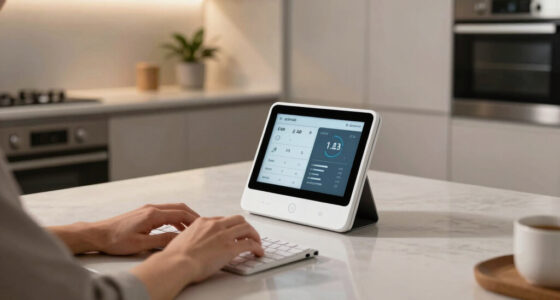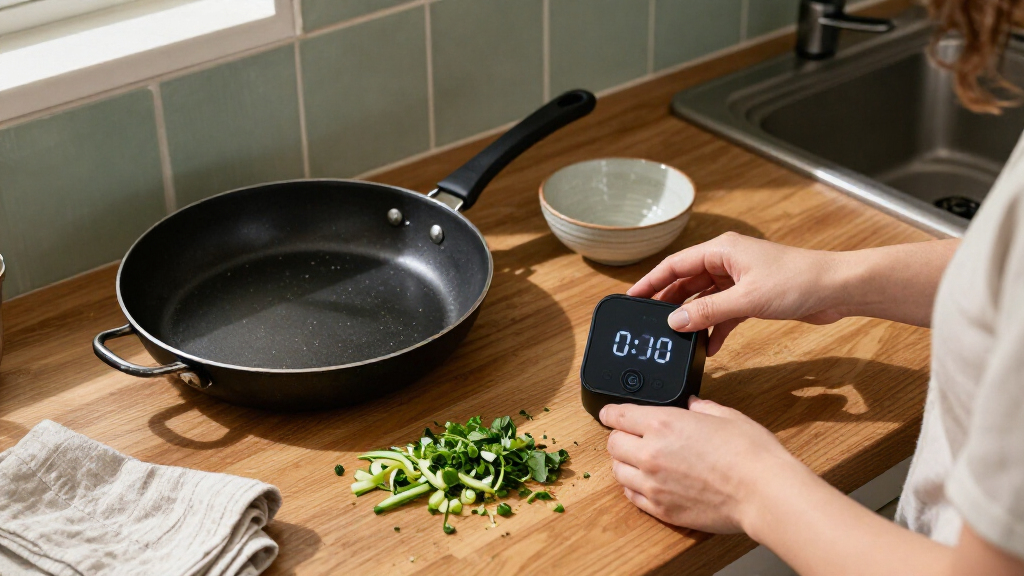

When choosing a smart kitchen timer, the real decision is whether cooking timers should live inside a voice assistant you already own or on a device built specifically to track food. Smart speaker timers, such as those used through Alexa or Google Assistant, are convenient for starting countdowns while your hands are busy and can handle recipes, reminders, and other household requests. Dedicated smart timers put countdowns on a screen or physical controls, often making several active timers easier to see at once.

Get home appliances delivered free with Prime
- Fast, free delivery on millions of items
- Prime Video, Amazon Music and more included
- Member-only deals all year
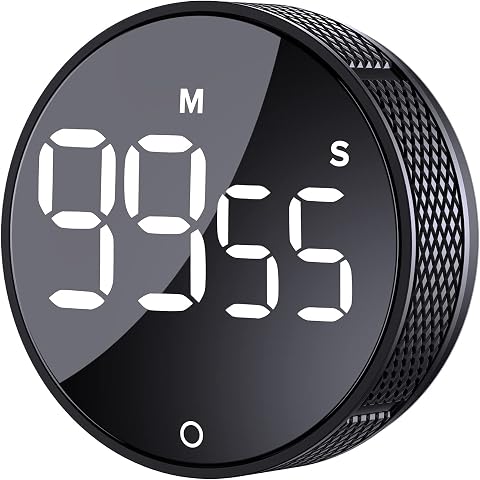
AVINIA Digital Kitchen Timer
- ✔ Timing: Countdown and count-up
- ✔ Range: 0–99 minutes
- ✔ Controls: Rotary outer ring and start/stop button

BlueSnail Kitchen Timer with LED Digital Display
- ✔ Timing: Countdown and count-up
- ✔ Range: 00:00 to 99:55
- ✔ Adjustment: Five-second increments

Antonki 2 Pack Digital Timer
- ✔ Quantity: Two timers
- ✔ Timing: Countdown and count-up
- ✔ Range: Up to 99 minutes and 59 seconds; no hour setting
The difference matters most when a recipe has multiple stages or when you need an alert you can notice over a noisy kitchen. A smart speaker is usually the better value if you already have one and mostly run one or two timers at a time. A dedicated timer can be worth its extra cost if you regularly cook several dishes at once, want a glanceable display, or prefer a timer that works independently of a voice assistant. Neither category guarantees the same features: displays, connectivity, app support, and sound levels vary by model.
At a Glance
| Criteria | Smart speaker kitchen timers | Dedicated smart kitchen timers | Winner |
|---|---|---|---|
| Starting timers | Hands-free voice commands; useful with wet or occupied hands | Physical controls or touchscreens; some models also offer voice or app control | A |
| Tracking multiple countdowns | Can support multiple timers, but naming and checking them can be awkward | Often designed to show several named countdowns together | B |
| At-a-glance visibility | Often no display, or a display shared with other functions | Usually the stronger point, with a dedicated screen or clear controls | B |
| Alerts in a busy kitchen | Voice alerts can be easy to miss amid appliances or conversation | Kitchen-oriented alarms may be more prominent, though loudness varies | Depends |
| Recipe and household features | Strong: may offer recipes, reminders, music, and smart-home controls | Typically focused on timers, with fewer general assistant features | A |
| Setup and connectivity | Usually requires a compatible assistant and internet for many features | Varies: simple models work alone; connected features may require Wi-Fi or an app | B |
| Cost and value | Often best value if you already own a compatible speaker | Extra cost can pay off for frequent multi-dish cooking | Depends |
AVINIA Digital Kitchen Timer
The AVINIA is our strongest all-round choice because it makes the central kitchen task—setting and checking a countdown—straightforward. We turn the outer ring to adjust time and use the front button to start or pause. That direct interaction is easier to manage with a busy hand than repeatedly pressing small controls, and the large LED digits are designed to be legible across a counter. It counts up as well as down, covering both a planned bake and an open-ended task such as monitoring a simmer.Its practical edge over BlueSnail is finer stated control: AVINIA lists a range of 0–99 minutes, while BlueSnail changes time in five-second increments. Both have a rotary ring, but AVINIA’s description emphasizes three brightness levels and three alarm levels, including silence and a loud setting up to 90 dB. This gives us more ways to adapt it to a dim kitchen or a noisy room. The rear magnets support placement on a refrigerator or other iron surface, keeping it visible and freeing counter space.There are limits. The listed range is under 100 minutes, and the product information does not identify multiple simultaneous timers, so cooks coordinating several dishes may need another unit. At about 3.15 inches square, it is also larger than each Antonki timer. Choose AVINIA for a prominent, adjustable single timer; skip it if we need a set of separate countdowns or a very compact device.
Pros:
- Large LED display intended for viewing at a distance
- Rotary time adjustment with one-button start and pause
- Three brightness levels and three alarm levels, including silent
- Magnetic back and count-up as well as countdown timing
Cons:
- Timing range is limited to 99 minutes
- No multiple-timer function is specified
- Larger footprint than the compact Antonki units
Best for: Cooks who want one easy-to-read timer with simple rotary setting and flexible brightness and alarm options.
Not ideal for: People who need several independent timers, hour-long-plus timing, or the smallest possible device.
Bottom line: For most kitchens, AVINIA offers the best balance of visibility, easy adjustment and alert flexibility in a single timer.
“For most kitchens, AVINIA offers the best balance of visibility, easy adjustment and alert flexibility in a single timer.”
BlueSnail Kitchen Timer with LED Digital Display
BlueSnail suits cooks who like AVINIA’s rotary approach but want explicit control over both screen behavior and alarm tone. We turn the ring clockwise to add time and counterclockwise to reduce it, then press the front control to start or suspend. Its three-inch LED display is described as readable from the side and at a distance, which can help when the timer sits on a refrigerator or across the kitchen. The magnetic back is intended for metal surfaces, so it can stay close to the cooking zone without occupying a worktop.Compared with AVINIA, BlueSnail offers two screen modes: constant brightness or a normal mode that sleeps after five seconds. Its sound options are treble, bass and silent. That is a useful combination when a bright display is distracting or a sharp beep is unwelcome. The stated timing range reaches 99 minutes and 55 seconds, and the display changes in five-second steps. That granularity is adequate for many kitchen tasks, but it is less suited to recipes where we want to set a very short interval precisely. AVINIA’s listed range is similar, while its product details give brightness and alarm levels without BlueSnail’s specific five-second increment.BlueSnail’s role is a configurable single timer, not a multi-timer hub. Its description does not specify battery type or count, so we cannot compare its power setup directly with AVINIA’s three AAA batteries or Antonki’s included cells. The six-month return or replacement service is also shorter than the warranties listed for the other products. Pick BlueSnail if display sleep and tone choice are priorities; consider Antonki instead if we want two separate timers or a silent visual alert for another room.
Pros:
- Rotary ring increases or reduces the set time
- Three-inch LED display with constant and sleep modes
- Treble, bass and silent volume choices
- Magnetic mounting and count-up/countdown modes
Cons:
- Adjusts in five-second increments
- Timing range stops at 99 minutes and 55 seconds
- Battery type and quantity are not specified in the supplied details
Best for: Cooks who want a large rotary-set timer and the option to silence the display or choose a different alarm tone.
Not ideal for: Users who need precise adjustments under five seconds, multiple timers, or clearly documented battery details.
Bottom line: BlueSnail is a good fit when adjustable screen behavior and sound matter more than fine time increments or a second timer.
“BlueSnail is a good fit when adjustable screen behavior and sound matter more than fine time increments or a second timer.”
Antonki 2 Pack Digital Timer
Antonki takes a different route from the two rotary timers: rather than putting more controls and display options on one unit, it supplies two separate timers. That is useful when we want to time an oven dish and a stovetop pot independently, or leave one unit in the kitchen and another at a desk. Each timer counts up or down to 99 minutes and 59 seconds and has a memory function that retains the last setting. The M/S buttons are a more conventional setup than AVINIA’s twist ring, but can feel familiar to anyone used to setting a digital stopwatch.Its strongest kitchen distinction is the choice between an audible alarm and a silent flashing red light. The visual alert can suit a quiet household, a sleeping child nearby or study time, while AVINIA and BlueSnail also offer silent options without Antonki’s stated flash-only mode. Three placement choices—magnet, kickstand and hanging hole—make each unit more flexible than the magnetic-only placement described for the other two. Batteries are included, so the set is ready to use out of the box.The tradeoff is a smaller screen and less hands-off power management. Each timer measures about 2.48 by 2.68 inches and 0.63 inches thick, making it easier to tuck away than AVINIA or BlueSnail, but the compact display may be harder to read across a busy kitchen. There is no automatic shutoff; we must switch each unit off on the back when finished. It also cannot set hours. Choose Antonki when separate timers and flexible mounting matter most. If we want one prominent display with quick rotary adjustment, AVINIA is the more convenient everyday pick.
Pros:
- Two timers included for separate tasks or locations
- Audible alarm or silent flashing-light alert
- Magnetic back, fold-out stand and hanging hole
- Batteries included and memory for the last time setting
Cons:
- No hour setting; maximum range is 99 minutes and 59 seconds
- Must be switched off manually to conserve battery
- Compact display is smaller than the large-format rotary models
Best for: Households that need two independent timers, or want one unit for cooking and another for homework or workouts.
Not ideal for: Cooks who need a large display at a distance, hour-based timing, or automatic shutoff.
Bottom line: Antonki is the practical choice for timing two tasks at once, provided we are comfortable with a smaller display and manual shutoff.
“Antonki is the practical choice for timing two tasks at once, provided we are comfortable with a smaller display and manual shutoff.”
As an Amazon Associate we earn from qualifying purchases.
Key Differences
The biggest practical split is between starting a timer and managing one. A smart speaker excels at quick voice requests: ask for a countdown while chopping, then ask how much time remains. That works particularly well for simple meals and cooks who already use an assistant around the home. But when several dishes need separate countdowns, a screen or dedicated control can make it easier to see which one is nearly done without asking follow-up questions.
Dedicated timers trade some of that broader convenience for focus. Their displays, labels, and controls can keep cooking information visible even when you are not speaking to the device. They may also be easier to use if you do not want a voice assistant listening in the kitchen. The category is varied, though: a basic standalone model may offer excellent countdown controls but no app, while a connected model may depend on Wi-Fi or a phone for setup.
For most households, buying another device only makes sense when it solves a repeated cooking problem. If a speaker is already in the kitchen and one timer is enough, its included timer feature is generally the better value. If you often juggle oven, stovetop, and resting times, a dedicated model’s visibility and organization can justify the added expense.
Detailed Comparison
Starting timers (Smart speaker kitchen timers wins — moderate)
Smart speakers win for starting a countdown without touching anything: a short voice command is especially handy when hands are wet, messy, or holding a pan. Dedicated timers may have straightforward buttons or a touchscreen, and some support voice control, but that varies by model. The advantage is moderate for cooks who frequently need hands-free control and minor for anyone comfortable tapping a screen.
Tracking multiple countdowns (Dedicated smart kitchen timers wins — major)
Dedicated timers generally win when several dishes are cooking at once because many show multiple countdowns and let users label them. Smart speakers can run more than one timer, but asking which timer is active or how much time remains may take extra voice exchanges, and display support differs. The gap is major for holiday meals or batch cooking, but minor if you usually track one item.
At-a-glance visibility (Dedicated smart kitchen timers wins — moderate)
A dedicated timer usually wins because its main job is to keep remaining time visible. A smart speaker without a screen requires an audio check-in; a screen-equipped speaker may help, but its timer display can be smaller or less central. The difference is moderate: seeing a countdown across the room can reduce repeated checks, while cooks who rely on audio may not care.
Alerts in a busy kitchen (moderate difference)
There is no universal winner. A smart speaker may announce the timer, while a dedicated unit may use a louder tone, flashing display, or other alert. Performance depends on the model, room layout, and background noise. Compare alarm volume and alert style before buying if you often run an extractor fan, listen to music, or move between rooms; otherwise this is a minor difference.
Recipe and household features (Smart speaker kitchen timers wins — moderate)
Smart speakers win clearly on breadth: the same device may answer cooking questions, read a recipe, set reminders, play music, and control compatible smart-home equipment. Most dedicated timers focus on countdowns and offer fewer extra features. This gap is moderate if you already use a voice assistant while cooking, but has little value if you want a quiet, single-purpose device.
Setup and connectivity (Dedicated smart kitchen timers wins — moderate)
Standalone dedicated timers win on independence: many can start counting as soon as they are powered, without an account, network, or phone. Connected dedicated models are an exception, and smart speakers often need internet access for much of their assistant functionality. The gap is moderate for users with unreliable Wi-Fi or a preference for simple controls; it is minor in a well-connected kitchen.
Cost and value (major difference)
Smart speakers are usually better value when one is already available, since using its timer typically adds no purchase cost. A new speaker may offer more functions for its price, while a dedicated timer asks you to pay for a focused display and controls. The winner depends on use: the premium is justified for frequent multi-timer cooking, but poor value if a speaker already covers your routine.
Smart speaker kitchen timers: Pros and Cons
Pros:
- Hands-free countdowns are easy to start while cooking.
- Can combine timers with recipes, reminders, music, and smart-home control.
- Strong value if a compatible speaker is already in the kitchen.
Cons:
- Audio-only models make remaining time less visible.
- Managing several named countdowns can require repeated voice requests.
- Many assistant features depend on internet access and voice recognition.
Dedicated smart kitchen timers: Pros and Cons
Pros:
- A dedicated display can show remaining time at a glance.
- Often better organized for several simultaneous cooking tasks.
- Standalone models may work without an account or network.
Cons:
- Costs extra when a speaker already handles basic countdowns.
- Usually offers fewer general-purpose assistant features.
- Connected features, alarm volume, and display quality vary widely by model.
Who Should Choose What
Choose Smart speaker kitchen timers if:
- You already own a compatible smart speaker and usually run one or two timers.
- You want to start countdowns by voice while your hands are occupied.
- You also want recipes, music, reminders, or smart-home controls in the kitchen.
Choose Dedicated smart kitchen timers if:
- You regularly cook several dishes with overlapping countdowns.
- You want remaining times visible without asking a voice assistant.
- You prefer a focused device or want a standalone timer that can work without Wi-Fi.
Skip both if: You only need an occasional basic countdown and neither voice control nor a dedicated display solves a recurring problem; a simple inexpensive timer or phone timer may be enough.
Value for Money
Paying more for a dedicated smart timer is worthwhile when its screen, labels, or controls prevent confusion during frequent multi-dish cooking. Those benefits are concrete if you often coordinate several ovens, pans, or resting periods. They are harder to justify for a cook who starts a single countdown and hears the alert reliably.
If you already own a kitchen smart speaker, try its timer feature before buying another device. That is usually the best value for ordinary cooking. If you need to purchase something new, compare the cost of a multifunctional speaker with a dedicated model’s specific display, alarm, and connectivity features. Pay the premium only for capabilities you will use repeatedly; a higher price alone does not guarantee a clearer display or louder alert.
Final Verdict
For most people who already have a compatible smart speaker, use it as the kitchen timer first. It starts countdowns hands-free and costs nothing extra, while also serving other kitchen needs. Choose a dedicated smart timer if you routinely track several dishes, need visible remaining times, or want controls that work independently of a voice assistant. The deciding factor is whether timer management—not simply starting a countdown—is a regular source of friction. If it is, the dedicated display can be worth the added cost; if it is not, the speaker is the more sensible buy.
Frequently Asked Questions
Can a smart speaker run more than one kitchen timer?
Many can run multiple countdowns, but the exact limits and ways to name or check them vary by assistant and model. If you regularly need several timers, check whether you can identify each one by name and see its remaining time easily.
Is a dedicated smart timer better for cooking several dishes?
Often, yes. Models that display multiple labeled countdowns make it easier to track which dish needs attention. Check the actual display and controls before buying, since not every dedicated model supports several timers.
Does a smart kitchen timer need Wi-Fi?
A standalone dedicated timer usually does not. Smart speakers rely on connectivity for many assistant features, and connected dedicated timers may also use Wi-Fi or an app. Check a specific model’s offline behavior if your kitchen connection is unreliable.
Is a smart timer worth buying if I already have a smart speaker?
Only if the speaker’s timer routine leaves a practical gap, such as poor visibility or difficulty tracking several countdowns. For occasional single timers, the speaker is generally better value.