

Choosing a smart thermostat for home heating is less about adding an app than deciding how much control you want over schedules, room temperatures, and your existing heating equipment. The Google Nest Learning Thermostat (4th gen) aims to learn a routine and adjust around it; the ecobee Smart Thermostat Premium puts more emphasis on remote room sensors, configurable comfort settings, and system monitoring.

Get home appliances delivered free with Prime
- Fast, free delivery on millions of items
- Prime Video, Amazon Music and more included
- Member-only deals all year

Google Nest Thermostat – Smart Wi‑Fi Thermostat
- ✔ Connectivity: Wi-Fi, 2.4 GHz and 5 GHz
- ✔ Voltage: 24 volts
- ✔ Power: Battery powered
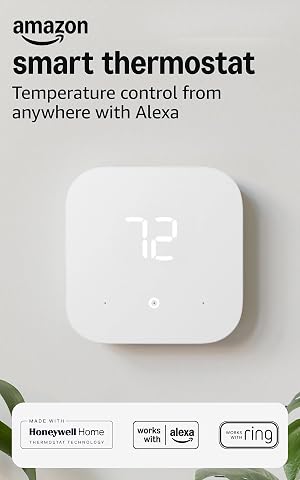
Amazon Smart Thermostat
- ✔ Model: S6ED3R
- ✔ Dimensions: 3.56 × 3.56 × 0.84 inches
- ✔ Compatibility: Most 24V HVAC systems

Honeywell Home Wi‑Fi Smart Color Thermostat (RTH9585WF1004)
- ✔ Model: RTH9585WF1004
- ✔ Connectivity: Wi-Fi
- ✔ Control: Touchscreen and voice
Both can schedule heating, offer remote app control, and help manage energy use, but they suit different homes. Nest is the simpler fit if you want the thermostat to adapt with little ongoing input. Ecobee is a stronger fit if temperatures vary between rooms or you want to tune heating around where people spend time. Compatibility with your boiler, furnace, heat pump, and wiring should come before either choice.
At a Glance
| Criteria | Google Nest Learning Thermostat (4th gen) | ecobee Smart Thermostat Premium | Winner |
|---|---|---|---|
| Heating compatibility | Supports many common systems; check the compatibility checker, especially for multi-stage or unusual wiring | Supports many common systems, including many heat pumps; verify wiring and system-specific support | Depends |
| Room comfort | Optional Nest Temperature Sensors can prioritize selected rooms; sensor cost may be extra | Remote SmartSensors are a central feature for balancing temperatures across rooms | B |
| Scheduling and automation | Learns patterns and can adapt schedules, with user adjustments available | Detailed scheduling and comfort settings; more deliberate setup and tuning | A |
| Controls and app | Clean interface, app control, and Google Home integration | App and thermostat controls with broad smart-home integrations | Depends |
| Energy management | Energy reports and scheduling tools; savings depend on household behavior and system | Scheduling, occupancy features, and energy reports; results vary by home | Tie |
| Extra features | Google Home ecosystem features; no built-in air-quality monitor | Built-in air-quality monitoring and voice assistant features | B |
| Value | Worth the premium for low-maintenance automation and Google integration | Worth more when room sensors or extra monitoring address a real need | Depends |
Google Nest Thermostat – Smart Wi‑Fi Thermostat
For households weighing smart control against installation complexity, the Google Nest Thermostat is the broadest starting point in this group. It works without a C-wire in most homes, which gives it an advantage over the Amazon model, whose stated setup requires a C-wire or adapter. That distinction can reduce friction for some installations, though it does not make Nest universally wire-free: heating-only and zone systems may still need a C-wire or power accessory.For heating, Nest’s away adjustments and remote control through the Google Home app make it a good fit for people whose routines vary. It also supports voice assistants including Google Assistant and Alexa, so it is less tied to one assistant than the Amazon thermostat. HVAC monitoring alerts may help flag system issues, although they do not replace maintenance or establish that a particular furnace or heat pump is compatible.The tradeoff is a relatively restrained interface: the listed display is small and control relies on a button, while Honeywell gives buyers a customizable color touchscreen and usage reports. Nest’s smart features also depend on reliable Wi-Fi, and the product uses battery power that may require periodic replacement. We put it first for its balance of install flexibility and remote convenience, provided buyers verify their wiring and system type before purchase.
Pros:
- Works without a C-wire in most installations.
- Remote control through Google Home and voice control with Google Assistant or Alexa.
- Away adjustments can help reduce heating when the home is unoccupied.
- HVAC monitoring alerts provide an additional signal to check system performance.
Cons:
- Some heating-only and zone systems need a C-wire or power accessory.
- Small display and button-based control offer less at-wall guidance than Honeywell’s touchscreen.
- Battery-powered design may require periodic battery replacement.
Best for: Homeowners with a compatible low-voltage heating system who want app-based control and may not have a C-wire.
Not ideal for: People who want a large touchscreen, detailed on-device controls, or have a heating-only or zone system whose wiring needs have not been checked.
Bottom line: Nest is our strongest all-around option for many compatible homes when wiring flexibility and straightforward remote heating control matter most.
“Nest is our strongest all-around option for many compatible homes when wiring flexibility and straightforward remote heating control matter most.”
Amazon Smart Thermostat
If Alexa is already the household’s main way to manage connected devices, the Amazon Smart Thermostat brings heating control into a familiar app and voice setup. Its standout distinction is automation through presence detection and Thermostat Hunches, which can adjust temperature based on whether people are home. That makes it more hands-off than the Honeywell model’s emphasis on seven-day programming and usage reports, though buyers who prefer explicit control over each schedule may want to set their routine carefully.Amazon’s guided installation through the Alexa app can make setup easier to follow, and control is available through Alexa and Ring apps, voice, or on-device buttons. It is ENERGY STAR certified and includes indoor humidity sensing and an energy dashboard. Those features help users monitor the home and manage settings, but savings depend on the house, heating equipment, and behavior; we would not treat a stated potential savings figure as a guaranteed result.Compatibility is the limiting factor. This thermostat requires a C-wire or separate power adapter, works with most 24V HVAC systems, and supports only 2.4 GHz Wi-Fi. Nest is a more flexible choice for many homes without a C-wire and can use 5 GHz networks; Amazon is the more natural choice when the Alexa and Ring ecosystem is already in place. Like the other two, it is not for 110–240V line-voltage systems such as electric baseboard heat.
Pros:
- Works with Alexa and Ring apps, voice control, and on-device buttons.
- Thermostat Hunches and presence detection can automate temperature changes.
- Guided DIY installation is available through the Alexa app.
- Includes indoor humidity sensing and an energy dashboard.
Cons:
- Requires a C-wire or separate power adapter kit.
- Supports 2.4 GHz Wi-Fi only.
- Not compatible with 110–240V HVAC systems such as electric baseboard heating.
Best for: Alexa or Ring households with a compatible 24V HVAC system, a C-wire or adapter, and a 2.4 GHz Wi-Fi network.
Not ideal for: Homes relying on 5 GHz-only Wi-Fi, installations without a C-wire or adapter, or systems using electric baseboard heat.
Bottom line: Choose Amazon when Alexa and Ring integration outweigh the need for broader Wi-Fi and wiring flexibility.
“Choose Amazon when Alexa and Ring integration outweigh the need for broader Wi-Fi and wiring flexibility.”
Honeywell Home Wi‑Fi Smart Color Thermostat (RTH9585WF1004)
Honeywell’s RTH9585WF1004 is the display-first pick. Its customizable color touchscreen puts schedules and settings on the wall, making it a better match than Nest for people who want to adjust heating without depending on an app or a small button interface. The seven-day programmable schedule also suits households with a predictable weekly routine, while remote control remains available through the Honeywell app, Alexa, and Google Home.Its strongest heating advantage is the range of conventional systems listed: forced air, hot water, steam, and heat pumps, with a C-wire. That makes it a relevant option for homes where system type should guide the shortlist, rather than smart-home brand alone. Honeywell also offers Smart Response, energy usage reports, and demand-response participation. Compared with Amazon’s presence-based approach, those tools give users more visibility and scheduling control, but they do not automate occupancy decisions in the same way.The tradeoff is installation. A C-wire is needed for many setups, and some homes may need an adapter, so Nest is easier to consider where wiring is uncertain. Honeywell also is not compatible with electric baseboard heating. Its larger set of system support claims does not guarantee fit for every configuration; confirm wiring, voltage, and equipment compatibility before installation. We rank it third overall because its clear strengths serve a narrower, display-oriented buyer rather than every home.
Pros:
- Customizable color touchscreen provides a more informative at-wall control experience.
- Seven-day programming suits predictable weekly heating routines.
- Supports forced-air, hot water, steam, and heat pumps when properly wired.
- Offers app and voice control, usage reports, and demand-response eligibility.
Cons:
- Requires a C-wire for many installations and may need an adapter.
- Not compatible with electric baseboard heating.
- Its feature-rich touchscreen may be unnecessary for buyers who primarily use app or voice controls.
Best for: People with compatible forced-air, hot water, steam, or heat pump systems who value an at-wall touchscreen and scheduled control.
Not ideal for: Homes with electric baseboard heat, installations where a C-wire or adapter is unavailable, or buyers who prioritize occupancy automation over hands-on scheduling.
Bottom line: Honeywell is the best fit here for buyers who want a capable wall interface and broad conventional-system support, after confirming the wiring.
“Honeywell is the best fit here for buyers who want a capable wall interface and broad conventional-system support, after confirming the wiring.”
As an Amazon Associate we earn from qualifying purchases.
Key Differences
The clearest practical difference is how each thermostat handles uneven room temperatures. Ecobee is built around adding remote sensors and using readings from occupied rooms to guide heating. That can help when a bedroom is cold while the hallway thermostat is already satisfied. Nest supports optional sensors too, but its appeal centers more on learning a household routine than building a sensor-led setup.
That distinction also shapes daily effort. Nest may suit people who want to set an initial schedule and make occasional corrections. Ecobee offers more ways to configure comfort and occupancy behavior, which can be useful in a complex home but asks for more setup. Neither thermostat can compensate for poor insulation, undersized radiators, or a heating system that cannot respond to the desired room-by-room settings.
Value depends on which features solve a real problem. Paying more for ecobee makes sense when sensors, compatibility with a particular system, or its monitoring features will be used. Paying more for Nest makes sense when hands-off schedule adaptation and Google Home fit matter. If either requires costly wiring changes or lacks full support for your heating controls, a compatible basic programmable thermostat may be the better purchase.
Detailed Comparison
Heating compatibility (major difference)
Both support a wide range of common heating setups, but neither should be bought on brand reputation alone. Compatibility can depend on wiring, heat-pump stages, and whether the system uses a proprietary controller. The winner depends on the exact equipment; check the manufacturer compatibility tools or consult an installer before ordering. This is a major decision criterion because an unsupported system can make smart features irrelevant.Ecobee wins for homes with temperature swings between rooms. Its SmartSensors are designed to let the system use readings from rooms beyond the thermostat location, and occupancy can inform which spaces matter. Nest can also use optional Temperature Sensors, so the gap is moderate rather than absolute. Ecobee is the clearer choice if a cold nursery or warm upstairs bedroom is the main complaint; neither option controls separate zones unless the heating system supports them.
Scheduling and automation (Google Nest Learning Thermostat (4th gen) wins — moderate)
Nest wins for people who prefer the thermostat to learn and adjust a routine with less schedule editing. Ecobee provides robust scheduling and comfort settings, but it tends to reward users who configure those settings deliberately. The gap is moderate: Nest reduces routine maintenance, while ecobee offers a more explicit setup for households with changing patterns.Controls and app (moderate difference)
There is no universal winner. Nest emphasizes a streamlined thermostat experience and works naturally in Google Home households. Ecobee provides extensive app and on-device controls and supports several smart-home ecosystems. The difference is moderate for users tied to a platform, but minor for someone who mainly changes a setpoint and leaves the schedule alone.Energy management (moderate difference)
Both provide scheduling and energy-use guidance, but neither can promise a particular bill reduction. Results depend on insulation, local weather, energy rates, heating equipment, and whether household members keep overriding settings. This is effectively a tie: choose based on the controls you will actually use, not an assumed savings figure.Ecobee wins on built-in monitoring, including air-quality information, and its Premium model includes voice-assistant capabilities. These features are a bonus rather than a heating advantage by themselves. The gap is minor if you only want temperature control, but more meaningful if you already want those functions in the room where the thermostat sits.
Value (moderate difference)
Neither is automatically the better bargain. Nest’s premium is justified when its learning approach and Google integration reduce effort for you. Ecobee’s higher spend is easier to justify when remote sensors address real comfort problems or its extra monitoring replaces another device. If you will not use those distinctions, a less expensive smart thermostat may deliver better value.Google Nest Learning Thermostat (4th gen): Pros and Cons
Pros:
- Learns household patterns to reduce schedule maintenance
- Straightforward choice for homes built around Google Home
- Supports optional room sensors
Cons:
- Room sensors may add to the total cost
- Less compelling when the main need is detailed room-by-room comfort tuning
- System compatibility still requires a wiring and equipment check
Pros:
- SmartSensors make remote-room comfort a central part of the system
- Detailed schedules and configurable comfort behavior
- Premium model adds air-quality monitoring and voice-assistant features
Cons:
- More setup choices may take time to configure
- Extra features raise the price and may go unused
- Sensors do not create independent heating zones in a single-zone system
Who Should Choose What
Choose Google Nest Learning Thermostat (4th gen) if:
- You want the thermostat to learn your routine and limit schedule adjustments.
- Your household already uses Google Home and values a consistent control experience.
- Room temperatures are reasonably even, or you only need occasional sensor prioritization.
Choose ecobee Smart Thermostat Premium if:
- Some rooms run noticeably hotter or colder than the thermostat area and you want sensor-based comfort control.
- You want detailed schedules and occupancy-aware settings you can tune.
- You will use the Premium model’s monitoring or voice features alongside heating control.
Skip both if: Skip both if your heating system is incompatible, you need independent room control that your system cannot provide, or you would not use app-based schedules and connected features. A compatible programmable thermostat may cost less and meet the need.
Value for Money
Paying more is worthwhile only when the premium feature changes how the home feels or how much attention the thermostat needs. Choose Nest for its learning approach if you want fewer schedule edits and already use Google Home. Choose ecobee when room sensors can address uneven temperatures, or when its monitoring and voice features replace devices you would otherwise buy.
For a home with one main living area and stable temperatures, the difference may not justify a premium over a simpler smart thermostat. Sensor purchases can also increase ecobee’s total cost, so compare the price of the thermostat plus the number of sensors you expect to use. Energy savings are not guaranteed and should not be the sole reason to pay more.
Final Verdict
For most buyers choosing between these two, the deciding question is whether room-by-room temperature variation is a real problem. Choose ecobee Smart Thermostat Premium if it is: its sensor-centered approach gives you a more direct way to prioritize occupied rooms, and the extra features add value if you will use them. Choose Google Nest Learning Thermostat (4th gen) if your temperatures are already comfortable and you want a thermostat that adapts to your routine with less schedule work, particularly in a Google Home household.
Before buying either, confirm support for your exact heating system and wiring. If both are compatible and you have no persistent room comfort issue, Nest is the simpler recommendation for low-maintenance scheduling. If you do have uneven temperatures, ecobee is worth paying more for when sensors can address the rooms that matter.
Frequently Asked Questions
Which is better for a house with uneven room temperatures?
Ecobee is the stronger fit when you want remote sensors to help the thermostat account for occupied rooms. Nest also supports optional Temperature Sensors, so compare sensor costs and how each system handles the rooms you care about. Neither creates new heating zones in a system that lacks them.
Will either thermostat work with a boiler or heat pump?
Both support many heating systems, including some boilers and heat pumps, but compatibility varies by model, wiring, and system controls. Check the manufacturer compatibility tool using your exact setup before purchasing; an installer can help if the wiring is unclear.
Which one saves more on heating bills?
There is no dependable winner for every home. Both offer scheduling and energy tools, but actual costs depend on the heating system, insulation, weather, energy rates, and how settings are used. Treat savings as a possible result of better control, not a guaranteed return.
Is ecobee worth paying more for?
It can be if its room sensors address temperature differences or you will use its monitoring and voice features. If you mainly need remote adjustments and a schedule, those extras may not justify the higher total cost.
Should I choose Nest if I do not want to manage a schedule?
Nest is designed to learn patterns and can suit people who want less schedule maintenance. It still benefits from an initial setup and occasional review, especially when routines change. Ecobee can also automate schedules, but its appeal is strongest for buyers who want to tune more settings.