
TL;DR

Get home appliances delivered free — and shop member deals
- Fast, free delivery on millions of items
- Access to Prime Big Deal Days deals on October 6–7
- Prime Video, Amazon Music and more included
Grouping devices in a room allows you to control multiple smart devices with one schedule, saving time and energy. Proper setup improves convenience and reduces power waste, making your home smarter and more efficient.
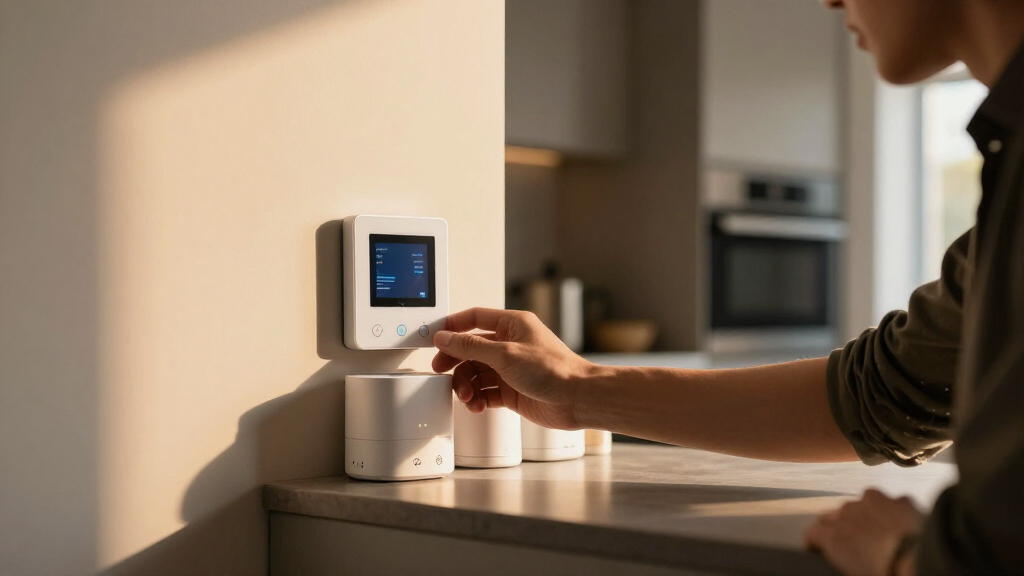
Imagine walking into your living room, and everything turns on with a single tap—lights, TV, music, even the smart blinds. That’s the power of grouping devices in home automation. Instead of managing each gadget separately, you create a unified schedule or routine for the entire space. It’s like giving your room its own brain, making life smoother and saving energy.
In this guide, you’ll discover how to set up these groups, the benefits they bring, and the latest tech that makes it all effortless. Whether you’re new to smart home tech or want to optimize your existing setup, understanding room-based scheduling can transform your daily routines.
Grouping devices in a room streamlines control and improves energy efficiency.
Create room groups in your smart platform, then set schedules that activate multiple devices at once.
Control can be both centralized and flexible—manage all devices together or individually as needed.
Recent tech advances make setup easier and routines smarter, with AI learning your habits.
Always check device compatibility and security settings before creating room-based automations.
What Exactly Is Device Grouping in Your Home?
Device grouping means combining multiple smart devices—lights, thermostats, plugs—into a single control unit for a specific room. Instead of toggling each device one by one, you activate or schedule them all together. For example, setting a ‘Movie Night’ scene turns on your smart TV, dims the lights, and adjusts the sound system—all at once.
This approach makes your home feel more intuitive. It’s like giving your living room a personality that responds to your daily rhythm, with a single command or schedule. The key advantage is efficiency—less time spent managing devices individually, and more consistent routines that prevent devices from being left on unnecessarily. However, the tradeoff can be a loss of granular control if you need specific devices to behave differently in certain situations. Balancing convenience with flexibility is essential when designing your automation setup.
As an affiliate, we earn on qualifying purchases.
How to Set Up a Room-Wide Schedule in 3 Simple Steps
- Choose a smart home platform compatible with your devices, like Google Home, Alexa, or Apple HomeKit. Your choice impacts how seamlessly you can create groups and schedules, as some platforms support more devices and integrations than others.
- Create a ‘Room’ or ‘Scene’ within that platform, then assign all devices in the room—lights, outlets, sensors—to this group. Think of this as creating a virtual space where all related devices are managed collectively, simplifying routine creation and adjustments.
- Set a schedule or automation rule for the group: specify when they turn on, off, or adjust based on time or activity. For example, turn on all lights at sunset or turn off after bedtime. The implication is that well-designed schedules can drastically reduce manual intervention, but overly rigid routines might conflict with spontaneous activities, so consider flexibility when programming these automations.
This process turns a jumble of gadgets into a synchronized, manageable system, making daily routines effortless and energy-efficient. The deeper benefit is that it encourages consistent habits, which can lead to significant energy savings over time, but it requires initial planning to avoid overly complex or conflicting routines.
home automation room control system
As an affiliate, we earn on qualifying purchases.
As an affiliate, we earn on qualifying purchases.
Compare Controlling Devices Individually vs. as a Group
| Control Method | Ease of Use | Flexibility | Energy Savings |
|---|---|---|---|
| Individual Control | High effort, one device at a time. This method allows for precise adjustments, which is useful when certain devices need different settings or schedules. However, it can become tedious and prone to inconsistency, especially in larger homes or busy routines. The tradeoff is time-consuming management and potential for human error, like forgetting to turn off a device. | Maximum, specific adjustments. You can tailor each device’s behavior to exact preferences, but this often complicates routine creation and maintenance, leading to fragmented control rather than holistic management. | Variable; risk of leaving devices on. Without a coordinated approach, individual control can lead to energy waste if devices are forgotten or left on, negating the benefits of automation. |
| Grouped Control | One command for all devices. While less granular, this method simplifies operation—turn everything on or off with a single command or schedule. The tradeoff is reduced specificity, which might not suit scenarios requiring different behaviors for devices within the same room. Nonetheless, the overall energy savings tend to be higher because it encourages turning off unused devices collectively, avoiding waste from overlooked gadgets. | Less granular, but customizable. Many platforms allow you to create subgroups or override settings for individual devices if needed, providing a balance between simplicity and control. The key is to design routines that are flexible enough to accommodate special cases without complicating the entire system. | Higher; easier to turn off unused devices. This advantage stems from the ability to manage multiple devices simultaneously, reducing the likelihood of energy waste due to oversight. |
As an affiliate, we earn on qualifying purchases.
Benefits You’ll Notice When Using Room-Based Schedules
First, convenience skyrockets. Imagine entering your bedroom—lights, fan, and even the coffee maker turn on automatically. That’s the power of a well-set room schedule. It saves you from fiddling with multiple apps or remotes, which can be frustrating and time-consuming. The deeper significance is that it transforms your home into an environment that anticipates your needs, making daily routines smoother and more enjoyable.
Second, energy savings become real. Turning off all devices in a room with a single tap or scheduled routine cuts down waste. For example, a study found that grouping smart plugs and lights reduces energy use by around 15–20% in that space. This not only lowers your utility bills but also contributes to environmental sustainability, reinforcing the importance of thoughtful automation design. The tradeoff is that overly aggressive routines may sometimes inconvenience users if not carefully calibrated, so regular review and adjustment are recommended.
Lastly, routines become more consistent. Your home responds predictably—lights dim at bedtime, the thermostat adjusts as you wake—creating a seamless experience that feels natural and effortless. Consistency reduces decision fatigue and can even improve comfort and sleep quality, but it requires careful planning to ensure routines align with changing schedules or preferences.
As an affiliate, we earn on qualifying purchases.
Latest Tech That Makes Room Schedules Smarter and Easier
Modern home automation platforms now support deeper integration and more intuitive controls. Enhanced compatibility means you can group devices across different brands—say, a Philips Hue light with a Nest thermostat—without hassle. This interoperability broadens your options but also introduces complexity; ensuring all devices communicate effectively can require troubleshooting and firmware updates. The implication is that a more interconnected system offers greater convenience but demands a solid understanding of device ecosystems.
AI-driven routines learn your habits and adjust schedules automatically. Want your living room lights to brighten as dusk falls? The system adapts over time, making automation feel more natural than ever. The tradeoff is that reliance on AI may sometimes lead to unexpected behaviors if routines aren’t properly calibrated, so periodic review is necessary to maintain optimal operation.
Voice control has also improved. Simply say, “Good night,” and your entire living room setup switches off, or turns on for movie time. Plus, energy monitoring tools now show you real-time consumption per room, helping you tweak routines for maximum efficiency. These advancements mean more effortless control and insight, but they also require secure networks and regular updates to prevent vulnerabilities.
What to Watch Out for Before You Group Everything
Compatibility is key. Not all devices speak the same language. Check if your smart plugs, bulbs, and sensors work with your chosen platform before creating a room group. Mismatched devices can lead to partial automation or failure, which can be frustrating and diminish the perceived benefits of your setup. Additionally, consider future scalability—selecting compatible devices now makes expanding your system easier later.
Security matters too. Protect your network with strong passwords, and keep firmware updated. A hacked device can compromise your whole setup, leading to privacy breaches or malicious control. The implication is that security should be an ongoing priority, not an afterthought, especially as systems grow more interconnected.
Finally, avoid making routines too complex. Start simple—turn everything off at night—and build up from there. Test your automation regularly to catch glitches early. Overly intricate routines can become unmanageable and lead to errors, which may negate energy savings or cause inconvenience. The key is to strike a balance between simplicity and functionality, ensuring your system remains reliable and effective.
5 Tips for Perfect Room-Based Schedules
- Keep routines simple—avoid overloading with too many triggers. Complex routines are harder to troubleshoot and may cause conflicts, reducing reliability. Prioritize essential triggers and consider user habits to create effective schedules.
- Use occupancy sensors to trigger automations when you’re actually in the room. This enhances energy savings by ensuring devices operate only when needed, but it requires proper sensor placement and calibration to avoid false triggers.
- Set realistic times—avoid schedules that turn things off or on at odd hours. Routines should align with your daily patterns to maximize comfort and efficiency, avoiding unnecessary disruptions.
- Regularly review energy reports to fine-tune your routines. Data-driven adjustments can uncover inefficiencies or over-automation, helping you optimize performance and savings.
- Test automations after any major device or platform update. Updates can introduce bugs or incompatibilities, so periodic testing ensures your system remains reliable and effective.
Frequently Asked Questions
How do I set up device grouping for an entire room?
Most smart home platforms let you create a room or scene and assign devices to it. Then, you can set schedules or automations for that group, turning multiple devices on or off with a single command or at a specific time.
Can I control grouped devices individually if needed?
Yes, many systems allow both group control and individual device management. This flexibility lets you automate the whole room but still tweak individual devices whenever necessary.
What platforms support room-based scheduling?
Popular options include Google Home, Amazon Alexa, Apple HomeKit, and Samsung SmartThings. Compatibility depends on your devices, so check that they work within your chosen ecosystem.
Are there limitations or compatibility issues?
Yes. Not all devices support grouping or scheduling, especially older or cheaper models. Always verify device compatibility before setting up complex automations.
How secure are these automation systems?
Security depends on your network setup. Use strong, unique passwords, keep firmware updated, and choose reputable brands to minimize risks of hacking or data breaches.
Conclusion
Picture your home responding to your daily rhythm with a single tap or scheduled routine. That’s the beauty of grouping devices—less fuss, less waste, more comfort.
Start small: create a room group, set a simple schedule, and watch your home work smarter. Your energy bills and daily life will thank you for it.
Fall Picks
fall essentials
As an affiliate, we earn on qualifying purchases.




![[Fact Check] Lee’s Claim Blaming Oh For Seoul Home Prices? - 최보식의언론](https://timerone.com/wp-content/uploads/2026/09/fact-check-lee-s-claim-blaming-oh-for-seoul-home-prices-featured-260x140.jpg)