
TL;DR
Smart home timers let you schedule compatible lights, plugs, switches, and appliances, with some systems also using sunrise, sunset, or sensor triggers. Check electrical ratings, platform compatibility, and whether schedules keep working without internet before you rely on one. A timer saves energy only when it reduces unnecessary run time or shifts use to a lower-cost period.
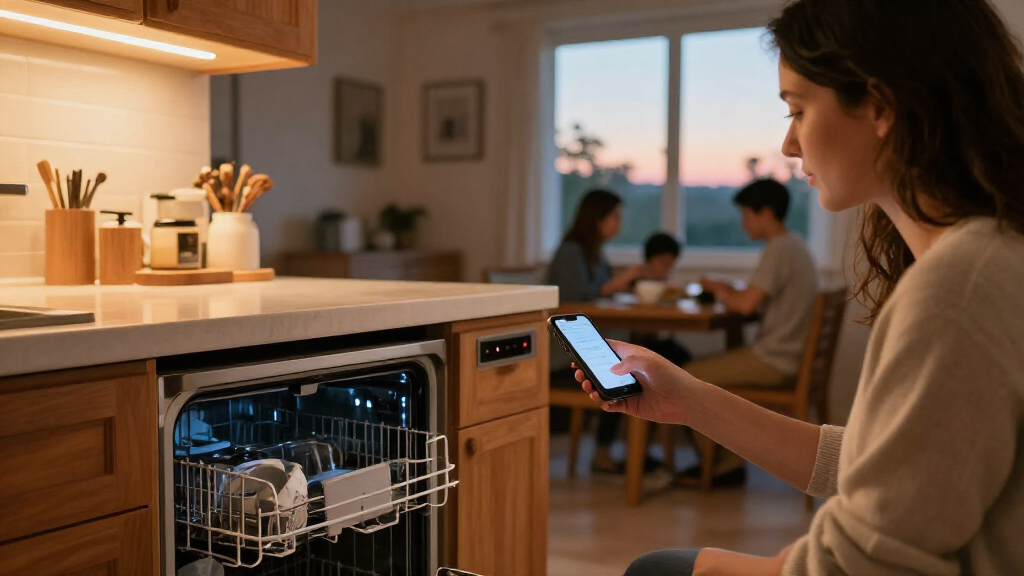
Your porch light can come on before the sky turns ink-dark, even when you’re still driving home. A smart home timer can make that happen, and it can also shut off a forgotten lamp or put a compatible plug-in device on a recurring schedule.

Get home appliances delivered free with Prime
- Fast, free delivery on millions of items
- Prime Video, Amazon Music and more included
- Member-only deals all year
The name covers several kinds of tools: schedules in an appliance, a smart plug, a wall switch, or a routine managed by an app or hub. The right choice depends on what you want to control, its electrical requirements, and whether you want the schedule to work without an internet connection.
You’ll learn what these timers can do, how to choose one that fits your home, and how to set up a useful routine without assuming that every smart device works the same way. You’ll also see where timers can help with energy management—and where safety calls for a different control or a licensed professional.
Choose a smart plug, wall switch, appliance timer, or app routine based on the device you want to control and how it connects.
Check the timer’s voltage, current, and load rating against the appliance instructions before use.
Confirm whether schedules run locally and what the device does after an internet or power outage.
Use sunset triggers only after checking the app’s location and time-zone settings; test schedules and manual overrides at home.
Expect energy savings only when the schedule shortens unnecessary operation or shifts flexible use to a suitable lower-cost period.
What Can a Smart Home Timer Control?
A smart home timer controls when a compatible device turns on or off, either at a set clock time, after a delay, or on a repeating schedule. Some systems can also trigger actions around sunrise or sunset, when a sensor detects movement, or when another automation condition is met. That flexibility makes a timer more like a household routine than a kitchen countdown clock.
For example, you could schedule a hallway lamp to turn on at 6:30 a.m. on weekdays and off after you leave. A basic schedule follows the clock; a more advanced routine might turn on the porch light at sunset, which shifts through the seasons without you changing the time every few weeks.
“Timer” can mean several different products. It may refer to a smart plug for a compatible plug-in lamp, a wall switch that controls a built-in fixture, an appliance’s own timer, or a routine in a smart home app. They are not interchangeable: a plug is not a replacement for a properly installed switch or a control for hardwired equipment.
Think of a schedule as a small stage manager: it cues one device to act at the right moment, while you decide which devices belong in the show. Start with one clear task. If you want a reading lamp off at bedtime, a recurring schedule is a simpler fit than adding motion sensors and several linked routines.
Products Worth Considering

DEWALT DWM120 10-Amp Deep-Cut Portable Band Saw

DEWALT 20V MAX XR Cordless Jig Saw (DCS334B)

EGO Power+ LV5000 Cordless Leaf Vacuum, Mulcher, and Blower
As an affiliate, we earn on qualifying purchases.
Choose the Timer That Fits the Device You Want to Control
The best smart home timer is the one that suits the device’s electrical setup and supports the schedule you need. A smart plug may fit a rated plug-in lamp, while a built-in wall control may suit a light fixture that you want to switch on from an app. Start with the device, then choose the control; the word “smart” on a package does not establish compatibility.
Before buying or setting up a control, check the appliance’s instructions and the timer’s voltage, current, and load rating. A small lamp and a motor-driven pump put different demands on a control. Heaters, high-power appliances, pumps, and devices with motors may need a purpose-built timer. Use a product only for loads its manufacturer permits.
Here is a simple way to narrow the choice:
- Name the device you want to schedule, and note whether it plugs in or is hardwired.
- Check its instructions and electrical load, then compare them with the timer’s ratings and restrictions.
- Pick the schedule or trigger: fixed clock times, a delay, sunset, or a supported sensor event.
- Check platform support for the app or hub you already use, including the specific functions you need.
- Confirm override and outage behavior before making the routine part of your daily life.
For instance, if you want a table lamp to come on while you cook, a rated smart plug may be a straightforward option. If you want to alter a hardwired ceiling light, follow local electrical requirements and use a licensed electrician for electrical work. Switch off power and use suitable PPE when a qualified person carries out work; don’t treat wiring or permits as minor details.
Understand Wi-Fi, Hubs, and What Happens When Internet Drops
A smart timer’s connection affects how you control it and whether its schedule keeps running during an outage. Products may use Wi-Fi, Bluetooth, Zigbee, Z-Wave, or Thread; some connect directly to your network, while others use a hub. The protocol can shape local control and compatibility, but no single label tells you how every feature will behave.
Ask two separate questions: does the timer need Wi-Fi, and does it need internet access? Those aren’t the same thing. A device may be able to communicate with a local hub over your home network even when your internet service is down, while remote app control may be unavailable. Some products store schedules locally; others depend on a cloud service.
Imagine your router loses its internet connection during a storm. If your hallway light schedule runs locally, it may still switch on at its usual time. If the timer depends on a cloud service, the routine may pause until service returns. Check the manufacturer’s documentation for what happens after both an internet outage and a full power failure, including whether the device restores its previous state or resumes its schedule.
Recent platforms have added support for standards such as Matter, and Thread can create a low-power mesh for compatible devices. Still, a Matter or Thread label does not promise that every timer feature works in every app. Before choosing, check the current compatibility list for your platform—Apple Home, Google Home, or Amazon Alexa—and confirm that it covers the particular action you want.
Build Schedules That Follow Your Real Routine
A useful timer schedule matches what you actually do, with an easy way to adjust it when your plans change. You can set fixed times, recurring days, delays, or—if your device and platform support them—sunrise, sunset, presence, or sensor triggers. The most reliable starting point is one routine with a clear job and a manual override.
Try a weeknight entry routine: turn on the porch light around local sunset, then switch it off at a time when you’re usually indoors. A sunset trigger adjusts through the year, unlike a fixed 5:00 p.m. schedule. It does depend on correct location and time-zone settings, so check those details in the app.
Clock changes, holidays, and travel can make a schedule behave differently than you expect. Many apps adjust clock-based schedules for daylight saving time, but support varies; holiday routines may need separate settings or a manual change. If you leave town for a long weekend, a simple override or pause button can save you from rebuilding a schedule when you return.
Run the routine while you’re home first. Confirm the device switches at the expected time, then test the manual control and pause or resume option. If a lamp needs to come on earlier in winter, you can adjust the schedule without changing the rest of your setup. A timer should fit your day like a well-placed light switch: easy to use when the routine changes.
Save Energy by Cutting Run Time, Not Just Adding Automation
A timer can help you manage energy when it reduces unnecessary run time or moves flexible use to a lower-cost period. It does not automatically reduce consumption just because it is smart. Savings depend on the device, electricity rates, and how you use your home.
Suppose a hallway lamp stays on for an extra hour most evenings because someone forgets to switch it off. A schedule that turns it off at bedtime can cut that unwanted run time. By contrast, putting the same lamp on a timer when you already switch it off promptly may add convenience without changing energy use.
Some energy dashboards and utility programs can help you schedule flexible loads, but the benefit depends on the appliance and your electricity plan. Don’t shift use if the appliance’s instructions rule out scheduled operation, or if the new timing creates a safety or comfort problem. A timer should support a sensible routine, not encourage you to leave equipment running unattended.
For a practical check, compare the device’s normal operating period with the new schedule. If your outdoor light now runs from sunset until dawn, ask whether it needs to stay on all night or whether an earlier shutoff fits your routine. Small changes are easiest to understand: schedule one device, observe how you use it, and keep the setting only if it produces a real benefit.
Check Safety and Privacy Before You Rely on a Timer
A smart timer is suitable only when its electrical rating, the appliance instructions, and local rules support that use. Check the load rating and manufacturer guidance before connecting anything, especially a heater, pump, motor, or high-power appliance. Never assume that a timer can safely switch every device that fits into its socket.
Hardwired switches and other electrical work require care with power, PPE, and local requirements. Use a licensed professional for electrical work, and follow applicable code and permit rules. If a control needs installation inside a wall, don’t improvise wiring based on a plug-in timer’s setup; they are different jobs with different safety requirements.
For privacy and security, review whether the timer requires an account, what app permissions it requests, and how long the maker promises software updates. Check whether schedules can run locally or whether routine control depends on a cloud service. If you prefer a simple setup, a locally stored schedule may suit you; if you want remote access while away, a connected service may offer that convenience.
Timers can make lights appear active while you’re away, but varied lighting is only one small security measure. For example, a living-room lamp that turns on in the evening may make an empty home look less dark; it does not detect a break-in or replace a security system. Choose an automation for the job it can actually do.
Frequently Asked Questions
What is a smart home timer, and how is it different from a regular timer?
A smart home timer schedules a compatible device through an app, hub, or built-in control, and it may offer remote access or sensor-based routines. A regular timer usually uses local dial or electronic controls and may offer fewer ways to connect it to other devices.
Can I use a smart plug as a timer?
Often, yes, for a compatible plug-in device within the smart plug’s ratings. Check the appliance instructions and the plug manufacturer’s load limits first; a smart plug is not a substitute for a properly installed switch or a control for hardwired equipment.
Will a smart home timer work without Wi-Fi or internet?
It depends on the product and where it stores its schedule. Some timers run schedules locally after setup, while others rely on a hub or cloud service. Check both internet-outage and power-failure behavior before relying on the routine.
Can I schedule a timer for sunrise or sunset?
Many platforms support sunrise or sunset triggers, usually using your home’s location and time zone. Confirm that your device and app support the feature, then check the location settings so the trigger follows local daylight.
Do smart timers save energy or money?
They can help when they reduce unnecessary operating time or shift flexible use to a lower-cost period. Savings depend on the appliance, your electricity plan, and your existing habits; a timer alone does not guarantee lower use.
Are smart timers safe for heaters and other high-power appliances?
Not automatically. Check the timer’s electrical ratings and the appliance manufacturer’s instructions; some heaters, motors, pumps, and high-power loads require a purpose-built control. Use a licensed professional for hardwired electrical work and follow local code and permit rules.
Conclusion
Start with one device and one clear job: a porch light at sunset, a lamp off at bedtime, or another compatible device on a sensible schedule. Check its ratings and instructions, confirm the app supports the routine you want, and test what happens when you override it or lose internet access.
Remember: a smart timer earns its place by making a safe routine easier and trimming operation you don’t need. Set it thoughtfully, then let your home keep time in the background.