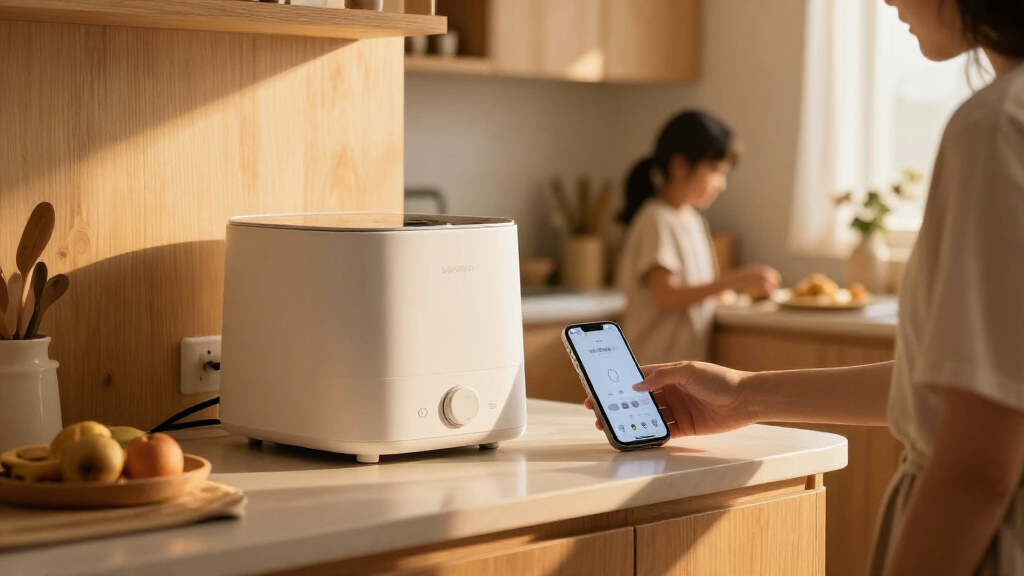

Choosing a smart home automation timer is less about setting a clock than deciding how much of your home you want schedules to coordinate. Hub-based smart timers connect through a central controller, which can link lights, plugs, sensors and other devices in shared routines. Wi-Fi smart timers connect directly to your router and are usually easier to set up for one device at a time.

Get home appliances delivered free with Prime
- Fast, free delivery on millions of items
- Prime Video, Amazon Music and more included
- Member-only deals all year
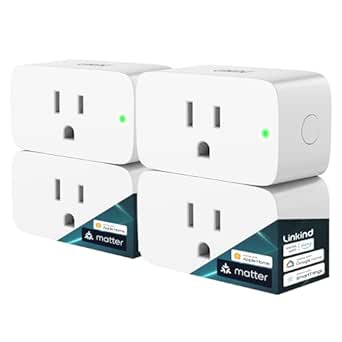
Linkind Matter Smart Plug (Works with Apple Home, Alexa, Siri, Google Home)
- ✔ Plug format: Type A
- ✔ Power rating: 15 A / 1800 W
- ✔ Wi-Fi: 2.4 GHz only

Smart 5G 15A WiFi Plug with Alexa & Google Home Compatibility, Dual-Band (2.4GHz/5GHz) Outlet Timer, ETL/FCC Listed, White, 4-Pack
- ✔ Power rating: 120 V / 15 A / 1800 W
- ✔ Wi-Fi: 2.4 GHz and 5 GHz
- ✔ Other connectivity: Bluetooth
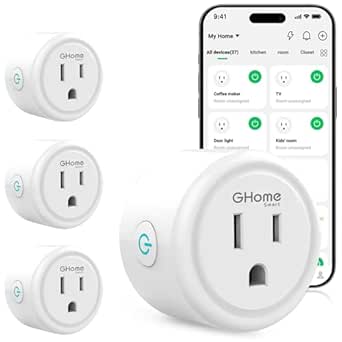
GHome Smart Wi-Fi Plug with App and Voice Control, 4-Pack
- ✔ Model: WP3
- ✔ Power rating: 120 V / 1200 W
- ✔ Wi-Fi: 2.4 GHz
The tradeoff is control versus simplicity. A hub can support broader automations and keep some schedules running when internet access fails, but it adds equipment, setup and compatibility checks. A Wi-Fi timer is often the better value for a lamp, fan or appliance with a straightforward schedule. Choose based on the number of devices, the routines you want and how much local control matters.
At a Glance
| Criteria | Hub-based smart timers | Wi-Fi smart timers | Winner |
|---|---|---|---|
| Setup and equipment | Requires a compatible hub or controller, plus device pairing | Connects directly to Wi-Fi; typically no separate hub needed | B |
| Automation across devices | Can coordinate schedules with sensors and other compatible devices | Usually schedules the connected device, with broader routines depending on app support | A |
| Operation during internet outages | Schedules may run locally if the hub and devices support local control | May lose remote access or cloud-dependent functions; local schedule behavior varies by product | A |
| Compatibility | Depends on the hub’s supported standards and product ecosystem | Must support the home’s Wi-Fi and the manufacturer’s platform or app | Depends |
| Remote access and control | Usually available through the hub maker’s app | Commonly controlled through the maker’s app, sometimes with voice assistant support | Tie |
| Privacy and dependence on services | Can reduce cloud dependence, though features vary by system | Often relies more on the manufacturer’s cloud and account | A |
| Upfront cost and value | Higher initial cost; more worthwhile as the number of devices and routines grows | Lower initial cost and strong value for a few simple schedules | Depends |
Linkind Matter Smart Plug (Works with Apple Home, Alexa, Siri, Google Home)
For households that want timers to live alongside other smart home routines, the Linkind Matter Smart Plug is the most flexible option in this comparison. It works with Apple Home, Alexa, Google Home, SmartThings, and AiDot, so buyers have more room to choose or change their preferred control platform. Its scheduling and offline LAN control also make it the clearest choice when reliable local operation matters, though the supplied details do not specify exactly how every platform behaves during an internet outage.That flexibility comes with a setup requirement: a Matter-certified hub or controller is needed for full platform functionality. This is a more involved entry point than the GHome WP3, which needs no hub, and may not be worthwhile if we only want a basic timed lamp. Against the dual-band GHome, Linkind offers a wider listed ecosystem but supports only 2.4 GHz Wi-Fi. Its 1800 W / 15 A rating matches the highest stated capacity in this roundup. The Type A format is for U.S. outlets, so it is not a universal travel option.
Pros:
- Matter support spans Apple Home, Alexa, Google Home, SmartThings, and AiDot.
- Offline LAN control is listed for operation without internet connectivity.
- 1800 W / 15 A capacity is the highest listed alongside the dual-band GHome plug.
- Compact, fire-resistant design with FCC and ETL certifications.
Cons:
- A Matter-certified hub or controller is required for full platform functionality.
- Wi-Fi support is limited to 2.4 GHz.
Best for: Buyers who already use, or plan to combine, Matter-compatible smart home platforms and want local control alongside scheduled switching.
Not ideal for: Shoppers without a Matter controller who want the simplest setup, or people who need 5 GHz Wi-Fi or a non-U.S. plug format.
Bottom line: We recommend Linkind for buyers who value Matter flexibility and local control enough to accommodate its hub requirement.
“We recommend Linkind for buyers who value Matter flexibility and local control enough to accommodate its hub requirement.”
Smart 5G 15A WiFi Plug with Alexa & Google Home Compatibility, Dual-Band (2.4GHz/5GHz) Outlet Timer, ETL/FCC Listed, White, 4-Pack
The dual-band GHome is the specialist pick for buyers who want a timer plug that can connect over either 2.4 GHz or 5 GHz Wi-Fi. That flexibility may help it fit networks where 5 GHz is preferred, while Bluetooth is listed as an additional connectivity method. It also has app scheduling, timers, group controls, voice control, and a push button, covering several ways to switch connected devices. Its 1800 W / 15 A rating puts it on par with Linkind for stated capacity and above the WP3’s 1200 W limit.The tradeoff is ecosystem breadth: the supplied compatibility list names Alexa and Google Home, not the wider Matter platform range offered by Linkind. Setup must start in the GHome app before linking to those assistants, so this is not a direct-to-assistant shortcut. Compared with WP3, this model’s higher power rating and dual-band support provide more flexibility, but the WP3 remains a suitable lower-capacity choice when basic 2.4 GHz scheduling is enough. The product is described as compact, though buyers should verify that a plug’s physical fit suits their outlet and neighboring sockets.
Pros:
- Supports both 2.4 GHz and 5 GHz Wi-Fi, plus Bluetooth connectivity.
- Rated at 15 A / 1800 W, matching Linkind’s listed capacity.
- Includes app scheduling, timers, group controls, voice control, and a push button.
- Four plugs per pack and FCC and ETL certifications.
Cons:
- The supplied assistant compatibility is limited to Alexa and Google Home.
- Initial setup must be completed through the GHome app before assistant linking.
Best for: Alexa or Google Home households that want app timers, group control, 5 GHz connectivity, and a stated 15 A capacity.
Not ideal for: Buyers who need Matter or Apple Home integration, or who want to avoid setting up a manufacturer app before linking a voice assistant.
Bottom line: We’d choose this GHome model when dual-band Wi-Fi and a 1800 W rating matter more than Matter’s broader platform reach.
“We’d choose this GHome model when dual-band Wi-Fi and a 1800 W rating matter more than Matter’s broader platform reach.”
GHome Smart Wi-Fi Plug with App and Voice Control, 4-Pack
The GHome WP3 is the straightforward choice for adding timed switching across several outlets without buying a hub. It offers schedules, timers, remote app control, and group control, with Alexa and Google Home compatibility. Its four-plug pack can make it easier to automate several lighter-duty devices at once, such as lamps, provided each device stays within the stated limits. Among these three, it has the lowest listed power ceiling: 1200 W, compared with 1800 W for both Linkind and the dual-band GHome.That lower limit is the key reason we rank it behind the other two for broad automation use. Buyers considering a higher-draw appliance should check its requirements carefully rather than assume all smart plugs share the same capacity. WP3 also needs a 2.4 GHz network and must first be set up in the GHome app before connecting to Alexa or Google Home. Unlike the dual-band GHome, it does not list 5 GHz support; unlike Linkind, it does not list Matter or offline LAN control. For uncomplicated timers on compatible devices, though, no hub is required, and the choice of GHome, Smart Life, or Tuya apps gives buyers multiple listed app options.
Pros:
- No hub is required for setup and use as described.
- Schedules, timers, remote app control, and group control are supported.
- Works with Alexa and Google Home and lists GHome, Smart Life, and Tuya apps.
- Four plugs are included for automating multiple compatible devices.
Cons:
- The 1200 W maximum is lower than the 1800 W listed for the other two picks.
- Requires a 2.4 GHz Wi-Fi network and initial GHome app setup.
Best for: Buyers automating several lower-power devices who want a hub-free plug with schedules, timers, and grouped control.
Not ideal for: People who need 5 GHz Wi-Fi, Matter integration, offline LAN control, or a plug rated for loads above 1200 W.
Bottom line: We’d pick WP3 for simple, hub-free schedules on lighter loads, while checking the 1200 W limit before connecting an appliance.
“We’d pick WP3 for simple, hub-free schedules on lighter loads, while checking the 1200 W limit before connecting an appliance.”
As an Amazon Associate we earn from qualifying purchases.
Key Differences
The biggest practical difference is how far a schedule can reach. A Wi-Fi timer typically tells one plug, bulb or appliance when to turn on or off. A hub-based system can link that schedule to other supported devices: a motion sensor might prevent lights from turning off while a room is occupied, or a routine might switch off several plugs together. That extra coordination matters when a household has multiple devices; it adds little for a single lamp.
Reliability and cost depend on the exact products. A hub can keep schedules local when both its software and connected devices support that behavior, but the word “hub” alone does not guarantee offline operation. Wi-Fi timers differ too: some retain schedules locally, while others depend more heavily on an internet service. Check the product’s outage behavior before buying. For most small setups, Wi-Fi offers better value. Paying more for a hub makes sense when local control, multi-device routines or a growing system will actually be used.
Detailed Comparison
Setup and equipment (Wi-Fi smart timers wins — moderate)
Wi-Fi timers win for a quick start: connect the device to the network, install its app and set a schedule. Hub-based timers require a compatible controller and often an extra pairing step. The gap is moderate for one or two devices, but the hub setup becomes easier to justify when it serves a larger system.
Automation across devices (Hub-based smart timers wins — major)
Hub-based timers win, often by a major margin, when a routine needs to control several device types. A schedule can trigger a group of lights or work with a compatible sensor. A standalone Wi-Fi timer is generally simpler and may be limited to its own device or routines supported by its app. For a single on-off schedule, the difference is minor.
Operation during internet outages (Hub-based smart timers wins — moderate)
Hub-based systems have the advantage when the hub can store and run schedules locally. That can keep routines working even if the internet connection drops. The win is moderate and conditional: the timer, hub and automation must support local operation. Wi-Fi products also vary, so check whether a schedule persists offline rather than assuming all Wi-Fi timers stop.
Compatibility (major difference)
There is no universal winner. A hub may support several device standards, but its supported brands and features still need checking. A Wi-Fi timer avoids a hub requirement, yet it must work with the home’s network and desired app or voice platform. Compatibility is a major issue when buying for an existing setup and minor when choosing a single device with clear support.
Remote access and control (minor difference)
Both types commonly offer app-based remote control when connected to the internet and configured with the relevant service. The difference is minor for basic scheduling. A hub may put several device controls and routines in one place; a Wi-Fi timer may be more direct for its own plug or appliance. Check app support and account requirements for either.
Privacy and dependence on services (Hub-based smart timers wins — moderate)
Hub-based timers can be a better fit for people who want routines to run locally, if the chosen system supports it. Many Wi-Fi timers depend more on an account or cloud service for remote control and sometimes automation. This is a moderate advantage for hub systems, not a guarantee: review data handling and local-control details for the specific product.
Upfront cost and value (moderate difference)
Wi-Fi timers usually cost less to start because there is no separate hub to buy. They are the stronger value for a few devices with uncomplicated schedules. A hub has a higher initial cost, but can offer better value across a larger setup if its shared routines replace several separate workarounds. The difference depends on how many devices and features will be used.
Hub-based smart timers: Pros and Cons
Pros:
- Can coordinate schedules across compatible devices
- May keep routines running locally during internet outages
- A single controller can manage a broader system
Cons:
- Adds the cost of a hub or controller
- Requires checking compatibility across hub and devices
- Setup can take longer than connecting a standalone timer
Wi-Fi smart timers: Pros and Cons
Pros:
- Usually the easiest and least expensive way to schedule one device
- Does not require a separate hub
- App control and basic schedules are widely available
Cons:
- Multi-device routines may be limited or tied to one app
- Some features can depend on internet access or cloud services
- Many Wi-Fi devices can add network and account clutter
Who Should Choose What
Choose Hub-based smart timers if:
- You want one schedule to coordinate lights, plugs, sensors or other compatible devices.
- Local routines during internet outages matter, and the specific system supports them.
- You already own a compatible hub or expect to build a larger smart home.
Choose Wi-Fi smart timers if:
- You need a timer for one or a few devices, such as a lamp, fan or seasonal light.
- Low upfront cost and straightforward app setup matter more than system-wide routines.
- You do not want to buy or maintain a separate controller.
Skip both if: Skip both if the device must operate on a fixed schedule without app, network or smart-home dependencies; use a reliable standalone timer suited to the appliance instead.
Value for Money
For a small setup, a Wi-Fi timer is usually the better value: it avoids hub expense and handles ordinary on-off schedules with less setup. Paying more for a hub is worthwhile when several compatible devices will share routines, when local control is a priority, or when a hub is already part of the home. Compare the total cost of the hub and timers with the features you will use, and verify outage behavior and compatibility before paying for advanced automation.
Final Verdict
Choose a Wi-Fi smart timer for a small number of devices and simple schedules. It is the practical recommendation for most people starting with one plug or light because it costs less and needs less setup. Choose a hub-based timer when you are coordinating several devices or need routines that can run locally, after confirming that the hub and devices support those features. The deciding factor is whether you need a timer for one device or an automation system for several.
Frequently Asked Questions
Do smart timers keep working if the internet goes out?
It depends on the product. Some timers retain schedules on the device or run them through a hub locally; others rely on internet services for some functions. Check the maker’s stated offline behavior for the exact model.
Is a hub-based timer better for a single smart plug?
Usually not. A Wi-Fi timer is generally cheaper and simpler for one plug with a basic schedule. A hub is more useful when that plug needs to participate in routines with other devices or local automations.
Can Wi-Fi timers work with voice assistants?
Many do, but support varies by product and platform. Confirm that the specific timer works with the assistant you use, and check whether voice control requires an account or internet access.
When is paying extra for a smart home hub worth it?
Pay extra when you will use multi-device routines, local control or the hub’s support for devices you already own. For a handful of independent schedules, the added cost is difficult to justify.