
TL;DR
Manual override lets you water zones immediately, outside the set schedule, without erasing your program. It’s useful for hot days, new plantings, or quick checks but needs careful use to avoid overwatering or breaking local rules. Knowing how your controller interacts with sensors and schedules keeps your yard healthy and compliant.
Imagine a scorching summer afternoon. Your grass wilts, and you want to give it a quick drink—fast and flexible. That’s where the manual override on your irrigation timer shines. It’s the feature that lets you water outside the usual schedule, giving your garden a boost when it needs it most.
But this handy tool isn’t foolproof. Many homeowners accidentally overwater, forget they turned it on, or break local watering rules. This guide clarifies how manual watering works, how to use it safely, and how to avoid common pitfalls—saving you time, water, and stress.
Manual override lets you water zones instantly without changing your schedule—perfect for urgent needs or testing.
Always match manual run durations to zone type: 5–15 minutes for spray heads, longer for rotors or drip zones.
Understand how your controller interacts with rain sensors—some override active rain delays, others don’t.
Use smart app features for quick, remote manual runs, and review logs to prevent overwatering.
Manual watering counts towards restrictions—avoid overdoing it during drought or local rules.
Irrigation Control · Field Guide
Manual Override on Irrigation Timers: Watering Outside the Schedule
Manual override lets you water one zone — or your whole yard — immediately, without erasing your programmed schedule. It’s the fastest way to answer a heatwave, settle new plantings, or test coverage. Used carelessly, it’s also the fastest route to runoff, overwatering, and fines.
5–15 min
Typical spray-head zone runtime
20–30 min
Rotor zones & full-program cycles
4 modes
Single zone · all zones · test · app quick-run
100%
Manual water counts toward local restrictions
01 · The Toolbox
Four Ways to Water Right Now
Almost every controller — from a basic hose-end timer to a Wi-Fi smart controller — offers some form of manual operation. Each mode is additive: the stored program stays intact and the timer returns to its normal schedule afterward.
Single Zone
Run One Zone, Custom Duration
Select one zone and set minutes. The go-to move for a wilting flower bed, a dry spot, or watering-in fertilizer.
Full Program
Run All Zones Once
The “Run All” option waters every zone in sequence — ideal for a pre-event system check, but risky on mixed soil types.
Test Mode
Short Bursts for Coverage Checks
Fires each zone for a brief burst so you can walk the yard, spot clogged nozzles, tilted heads, and leaks.
App Quick-Run
Remote Manual Start
Smart controllers put a button in your pocket: pick a zone, dial the minutes, start — from across town, with run history logged.
02 · Single-Zone Run

Orbit Mechanical Water Timer – Adjustable Irrigation Shutoff for Lawn & Garden Watering – Battery-Free Clockwork Hose Faucet Timer with Easy Grip Dial & Manual Bypass – 62034
Effortless Watering Automation: The Orbit Mechanical Water Timer helps manage lawn and garden irrigation with a reliable mechanical…
As an affiliate, we earn on qualifying purchases.
As an affiliate, we earn on qualifying purchases.
The 60-Second Manual Run
The exact buttons differ by brand — Hunter, Rain Bird, Orbit, Rachio — but the sequence is universal. The critical decision is step 3: duration should match the zone type, not a single default.
Find Manual / Water Now
A dedicated button on most digital timers, or a menu option on smart units.
Select the Zone
Press or scroll to the zone number you want to water.
Set Duration
Match zone type: shorter for sprays, longer for rotors and drip.
Press Start / Run
The valve opens immediately — outside the programmed schedule.
Auto Shut-Off
When time’s up the valve closes and the program resumes untouched.
Schedule intact — a manual run never shifts or cancels the next programmed start
03 · Duration & Timing

Orbit B-hyve Smart Indoor/Outdoor Sprinkler Controller – 6-Zone – App Controlled Smart Controller with Custom Irrigation Schedules – Weatherproof Multi-Zone Sprinkler System – 57946
Intelligent Irrigation Control: The Orbit Smart Sprinkler Controller manages watering with a powerful smart sprinkler that supports a…
As an affiliate, we earn on qualifying purchases.
As an affiliate, we earn on qualifying purchases.
How Long — and When — to Run Manually
Overwatering is the classic manual-override failure. Run times should scale with precipitation rate: sprays apply water fast, rotors and drip apply it slowly.
04 · Know Before You Override

Rachio WiFi Smart Sprinkler Controller (8-Zone Irrigation Remote Control) – App-Based Scheduling, Local Weather Intelligence, Rain Skips, Easy DIY Install
DITCH THE DIAL – Upgrade to smart irrigation with the free Rachio app for precise, easy control.
As an affiliate, we earn on qualifying purchases.
As an affiliate, we earn on qualifying purchases.
How Manual Runs Treat Sensors & Schedules
Behavior varies by brand and model — this is the most common troubleshooting point. Check your unit’s manual before assuming a rain sensor will stop your manual run.
| Scenario | Typical Behavior | Schedule Affected? | Watch Out For |
|---|---|---|---|
| Manual run vs. program | ✓ Additive — extra water on top of the plan | ✗ No — next start unchanged | Accidental double-watering the same zone on the same day |
| Active rain delay | ~ Varies — many controllers let manual runs bypass it | ✗ No — delay resumes after | Watering right before forecast rain arrives |
| Rain sensor active | ~ Model-dependent — some units block manual, some allow | ✗ No | Sensor-bypass switches; repeatedly overriding during wet periods |
| Local water restrictions | ✗ No exemption — manual counts the same | ✓ Same rules | Fines for watering on prohibited days/hours or causing runoff |
| Smart-controller logs | ✓ Logged — app records every manual run | ✗ No | Forgetting a run happened — review history weekly |
Battery-powered hose-end timers deserve special caution: on most, the manual button waters once and reverts — but on some models the valve stays open until you close it. That’s a classic cause of flooded beds.
05 · Failure Modes
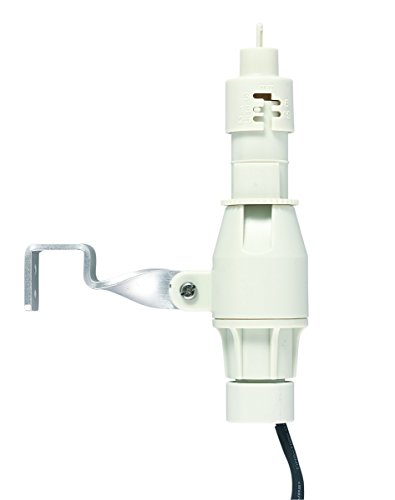
Orbit 57069N Rain and Freeze Sensor for Sprinkler Controllers
For automatically detecting rainfall or low temperature conditions
As an affiliate, we earn on qualifying purchases.
As an affiliate, we earn on qualifying purchases.
Manual Override Is Not a Free Pass
Every risk below traces back to the same root: manual watering bypasses the careful planning baked into your schedule.
Runoff on Clay Soils
Sprays apply water faster than clay absorbs it. Long manual runs sheet off the surface — wasting water and carrying nutrients away.
Double-Watering
The schedule doesn’t know you ran a zone manually. A morning manual soak plus the evening program equals a waterlogged lawn.
Negating Smart Sensors
Repeatedly overriding rain sensors defeats the water-saving logic you paid for — expect runoff, erosion, and higher bills.
Restriction Violations
In drought-regulated areas, manual irrigation counts toward allowed days and hours. Exceed limits and fines follow.
06 · Decision Chain
Before You Push the Button
A five-second mental checklist turns a manual run from a gamble into a precision tool.
07 · In Your Pocket
Smart Controllers Changed the Game
App-based Quick Run turns manual watering into a remote, measured, and auditable action — with weather-aware guardrails that older timers never had.
-
Per-zone minute controls Pick a zone, dial exact minutes, start — from anywhere, even across town.
-
Forecast conflict warnings Many apps flag when a manual run clashes with an incoming rain skip or restriction.
-
Run history logs Every manual run is recorded, so you can verify extra watering actually happened — and stop guessing.
-
Voice & sensor integration Alexa/Google zone starts, plus soil-moisture sensors that can block an unnecessary manual run.
What is Manual Override on an Irrigation Timer, and Why Use It?
Manual override is a feature that allows you to run one or more zones immediately—without waiting for the scheduled start. Think of it as a quick button to water now, whether you’re checking coverage or responding to a heatwave.
Why does this matter? Because it provides flexibility in watering, especially during unpredictable weather or urgent needs. If your plants are wilting or if recent weather conditions have changed unexpectedly, manual override lets you respond in real time, avoiding stress on your garden or wasting water. However, misuse or over-reliance can lead to overwatering, which may cause plant diseases or runoff issues, especially on soils with poor drainage. Therefore, understanding its proper use helps you balance immediate needs with long-term water conservation and plant health.
How to Run a Single Zone Manually — Step-by-Step
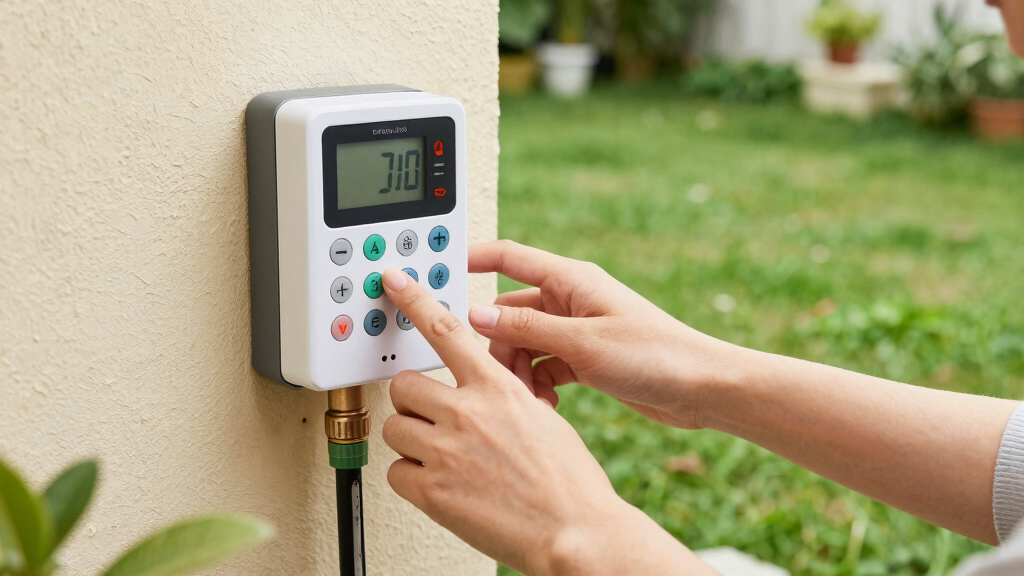
- Locate the manual or ‘Water Now’ button on your controller. On digital timers, this might be a dedicated button or a menu option.
- Select the zone you want to water. Usually, pressing or scrolling to the zone number does the trick.
- Set the duration. For typical spray zones, 5–15 minutes works well. Rotor zones might need 20–30 minutes. Consider the plant type, soil absorption rate, and weather conditions—shorter durations prevent overwatering, especially during cooler or rainy periods, while longer runs may be necessary during hot, dry spells.
- Press ‘Start’ or ‘Run.’ Your zone kicks on immediately, watering outside the schedule.
- Monitor the zone. When the time’s up, the valve turns off automatically, unless your controller is wired differently.
For example, a homeowner notices her new roses look a little wilted. She quickly runs her flower zone for 10 minutes—no fuss, no change to her schedule, just a quick drink for her plants. Remember, the key is to water just enough to revive the plants without risking runoff or water waste, which can harm the soil and plants over time.
Running the Whole Program Manually — When and How
If you want to water all zones at once, most controllers have a ‘Full Program’ or ‘All Zones’ manual option. This feature allows you to test your entire system or provide a quick watering session for the whole landscape. While convenient, it’s important to recognize the implications: running all zones simultaneously can lead to overwatering, especially if your landscape includes different soil types or plant water needs. Overwatering in such cases can cause runoff, leaching of nutrients, or waterlogging, which deteriorates plant health and wastes water.
To do this:
- Find the ‘Run All’ or similar button on your controller.
- Choose an appropriate duration—usually 20–30 minutes for a full cycle. Longer durations risk excess water in some zones, while too short might not adequately test coverage.
- Press ‘Start’ or ‘Run.’ Your system begins watering all zones at once.
Imagine you’re doing a quick system check before a big family gathering. Running all zones at once helps you identify leaks or missed heads quickly, but this approach should be used judiciously to prevent water waste and avoid stressing your landscape.
How Manual Runs Play Nice with Your Schedule and Sensors
Manual override adds water without canceling or delaying your programmed schedule—think of it as an extra shot of water, not a reset. This allows you to supplement your regular watering without disrupting the system’s overall plan. Understanding this interaction is crucial because it ensures you don’t unintentionally cause overwatering or conflict with automated controls.
Interactions with rain sensors and weather delays can be complex. Some controllers prioritize manual runs over sensor inputs, meaning you might water even if a rain sensor detects moisture. Others respect the sensor’s decision to skip watering, which helps prevent overwatering and runoff. For example, if a rain sensor detects rain and blocks scheduled watering, a manual run might still water if the controller is set to override sensors during manual operation. Conversely, some systems automatically respect sensor inputs regardless of manual commands.
Understanding these interactions is vital because improper manual use can negate the benefits of your smart sensors, leading to water waste or damage. For instance, repeatedly overriding rain sensors during rainy periods can cause unnecessary runoff, soil erosion, and increased water bills. Always review your system’s manual or settings to know how manual runs interact with sensors, especially in sensitive landscapes or during drought restrictions. Many controllers log manual operations, which can help you review your watering habits and prevent overuse that could harm your landscape or violate local regulations.
Using Smart Controllers and Apps for Quick Manual Watering
Smart controllers like Rachio, Hunter Hydrawise, and Rain Bird bring manual watering into your pocket. With their apps, you push a button for a quick zone run, often with adjustable minutes per zone. These apps often include features to prevent overwatering by integrating weather forecasts, soil moisture data, or restrictions, helping you make smarter watering decisions.
For instance, on a hot afternoon, you open the app, select your flower bed zone, and choose 10 minutes. Your system responds instantly, even if you’re across town or at work. Many apps also display recent watering history and can alert you if manual watering conflicts with forecasted rain or local restrictions, helping you stay compliant and avoid overwatering.
Using these tools effectively requires understanding their features. Setting appropriate durations, checking weather integrations, and reviewing logs can prevent unnecessary water waste or violations of local rules, making your manual watering both efficient and environmentally responsible.
Risks and Common Mistakes to Watch Out For
Manual override isn’t a free pass. Overwatering can lead to runoff, especially on clay soils, and waste water if you forget to turn it off. It can also inadvertently cause you to violate local watering restrictions—manual watering often counts the same as scheduled watering, and exceeding limits can result in fines or penalties.
For example, a homeowner leaves her manual run on for 30 minutes during a hot afternoon. Her lawn turns swampy, and she faces a hefty water bill, not to mention a violation warning from her city. Overwatering can also lead to disease, as excess moisture creates ideal conditions for fungi and pests. Additionally, neglecting to turn off manual mode after watering can cause unnecessary water use and potential damage.
To avoid mistakes:
- Always note how long you set manual runs and stick to recommended durations based on zone type and weather conditions.
- Check if your controller respects rain sensors during manual mode, to prevent watering during rain events.
- Turn off manual watering once your plants are satisfied—monitor your landscape to avoid overwatering and runoff.
Understanding these risks and managing manual override carefully ensures you conserve water, protect your plants, and stay compliant with local regulations. By doing so, you avoid unnecessary water waste, prevent plant health issues, and ensure your irrigation system remains a helpful tool rather than a source of problems.
Frequently Asked Questions
Does running a manual cycle cancel or reset my programmed schedule?
No, most controllers allow you to run a manual zone or program without changing your schedule. The system will resume its normal routine afterward.How do I run just one zone manually on my specific controller?
Check your manual or the controller’s menu for a ‘Manual Water’ or ‘Water Now’ option. Select the zone, choose your duration, and start—simple and quick.How long should I set a manual run for each zone?
Typically, 5–15 minutes for spray heads and 20–30 minutes for rotor zones. Adjust based on your zone’s watering needs and soil type.Will a manual run still work if a rain delay or rain sensor is active?
It depends on your controller. Some override rain delays, while others respect the sensor’s decision to skip watering—check your manual.Why won’t my timer’s manual mode turn the valve on?
Possible reasons include wiring issues, a dead battery, a master valve setting, or sensor lockout. Consult your system’s manual or a professional if needed.Conclusion
Knowing how to use manual override effectively turns your irrigation system into a flexible tool, not a set-it-and-forget-it machine. It’s about watering smart, not just watering more.
Next time you need a quick splash for your plants or a system check, remember: manual override is your friend—use it wisely, and your yard will thank you for it.