TL;DR

Get home appliances delivered free with Prime
- Fast, free delivery on millions of items
- Prime Video, Amazon Music and more included
- Member-only deals all year
Smart plugs let renters automate devices easily—plug-and-play, no rewiring needed. They connect via Wi-Fi or smart home platforms, offering remote control, scheduling, and energy savings. Security and compatibility are key for safe, seamless use.
Imagine turning on your living room lamp with a tap on your phone—no rewiring, no hassle. Smart plugs make this possible for renters who want modern convenience without risking their security deposit. They’re small, simple, and portable, fitting perfectly into a leaseholder’s toolkit.
In this guide, you’ll learn how smart plugs work, recent upgrades making them smarter and safer, and practical tips for using them without breaking any rules. Whether it’s scheduling your coffee maker or controlling your fan, these devices turn your rental into a smarter home—quickly and easily.
Smart plugs are plug-and-play devices perfect for renters—they require no rewiring or permanent modifications.
Use the app to create schedules and scenes that automate your devices effortlessly.
Choose models with energy monitoring to track and reduce your electricity use.
Always keep firmware updated and avoid overloading outlets for safety.
Smart plugs support voice control and can integrate with your existing smart home ecosystem.
Why Smart Plugs Are Perfect for Renters—No Wires, No Worries
Smart plugs are the easiest way to automate your home without rewiring or drilling. They simply plug into your existing outlets, turning any device into a smart device. Think of them as the remote controls for your appliances, but Wi-Fi enabled.
For example, you can schedule your bedside lamp to turn on at sunset or set your coffee grinder to start brewing before you wake up. All without touching any wires or asking your landlord for permission. They’re portable, affordable, and don’t leave a trace—perfect for tenants.
As an affiliate, we earn on qualifying purchases.
How to Set Up a Smart Plug in 3 Simple Steps
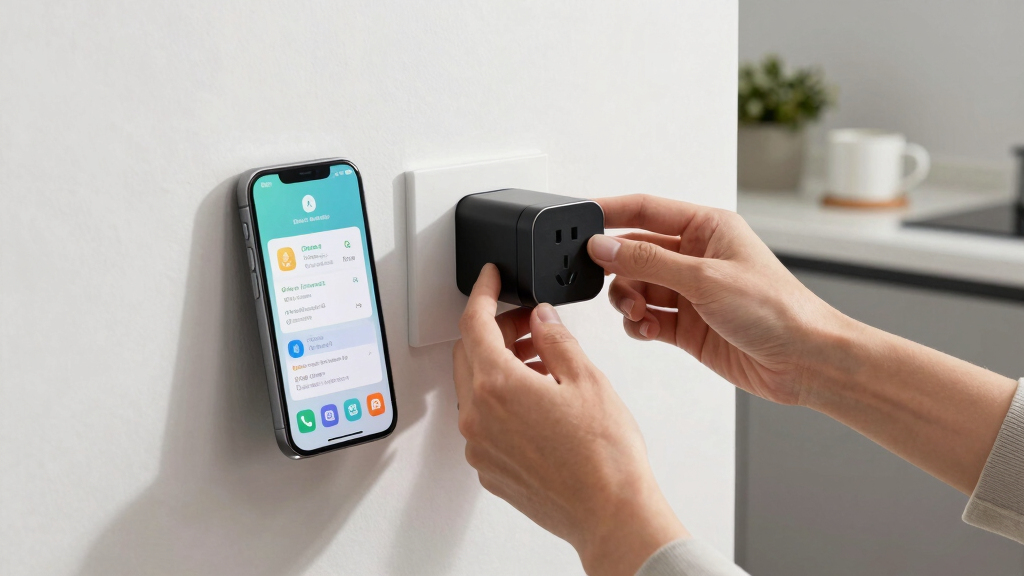
- Plug the smart plug into an outlet and connect your device to it.
- Download the manufacturer’s app and follow the pairing instructions.
- Connect the smart plug to your Wi-Fi network and customize your schedule or control it remotely.
Within minutes, you’ll have a device you can turn on or off from your phone. No electrician needed. Just a few taps and your device is ready to go—perfect for renters who want quick, hassle-free automation.
As an affiliate, we earn on qualifying purchases.
Compare Smart Plugs and Outlet Timers—Which Fits Your Rental Setup?
| Feature | Smart Plug | Outlet Timer |
|---|---|---|
| Installation | Plug-in, no wiring required | Plug-in, no wiring required |
| Control | Remote via app, voice control | Manual or timer-based |
| Automation | Schedules, timers, scenes | Fixed schedules, simple timers |
| Energy Monitoring | Often included | Rarely included |
| Compatibility | Wi-Fi, Zigbee, Z-Wave | Standard outlets, no connectivity |
If you want flexibility and remote control, a smart plug wins. For basic timing, an outlet timer is simple and reliable. Your choice depends on whether you want to automate with an app or stick to simple schedules.
As an affiliate, we earn on qualifying purchases.
Recent Upgrades Making Smart Plugs Smarter and Safer for Renters
New models now support voice assistants like Alexa, Google, and Apple, making control even easier. They also include energy monitoring, so you can see which devices sip the most juice—helping you cut bills. Compact designs mean they fit into tight outlets without blocking other sockets.
Security features have improved too. Many brands now encrypt your data and release firmware updates regularly, making sure your automation stays safe from hacking. Plus, some newer models offer offline control or backup batteries, so your setup works even during Wi-Fi outages.
As an affiliate, we earn on qualifying purchases.
Important Safety Tips When Using Smart Plugs in a Rental
Smart plugs are safe when used correctly. Always avoid plugging high-power devices like space heaters unless the plug’s rated for it. Keep firmware updated to patch vulnerabilities. And if you’re unsure about your lease rules, check with your landlord—most smart plugs are non-invasive and easy to remove.
Remember, never overload outlets or daisy-chain multiple plugs. Use smart plugs only with devices within their power limits. Taking these steps keeps your smart setup safe and your security deposit intact.
How Smart Plugs Help You Save Energy and Money
Automating devices with smart plugs means you turn things off when not needed. A lamp left on all night costs around $0.50 daily. By scheduling it to turn off at midnight, you save that money—and reduce your carbon footprint.
Energy monitoring features show exactly how much each device consumes. For example, your coffee maker might use 150 watts during brewing. Knowing this helps you decide whether to keep it plugged in or switch to a more efficient model.
Key Tips for Getting the Most Out of Your Smart Plugs
- Choose plugs with compatible voice assistant support for easier control.
- Set schedules based on your daily routine—morning wake-up, evening relax, etc.
- Use energy monitoring to identify energy hogs.
- Keep firmware updated for security and new features.
- Test your setup after installation to ensure everything works smoothly.
Frequently Asked Questions
Are smart plugs safe to use in rental apartments?
Yes, smart plugs are safe when used according to instructions. They require no wiring or drilling, making them non-invasive and perfectly suitable for rentals.Can I use smart plugs with any device?
Most household devices like lamps, fans, and chargers work well. Just check the wattage rating on the plug to ensure it can handle high-power appliances like space heaters.Will using a smart plug increase my electricity bill?
Not directly. However, automation can help you turn off devices when not in use, potentially lowering your energy costs over time.Are smart plugs secure to use?
Reputable brands use encryption and update firmware regularly. Keeping your Wi-Fi password strong adds an extra layer of security.Can I control smart plugs when I’m away from home?
Yes, through your smartphone app, as long as your smart plug is connected to Wi-Fi and your device has internet access.Conclusion
Smart plugs transform your rental from a passive space into a mini smart home—quickly, affordably, and with zero risk. They’re your secret weapon for convenience and savings. Just plug, set, and forget—your home’s smarter side is just a tap away.
Imagine walking into a cozy, perfectly lit apartment, all set by your scheduled automation. That’s the power of smart plugs—simple, portable, and game-changing. Why wait? Start automating today and enjoy a smarter rental life.
Halloween Picks
halloween
As an affiliate, we earn on qualifying purchases.