
TL;DR
Listen free for 30 days with Audible
Thousands of audiobooks and originals — cancel anytime.
Start your free trialAs an affiliate, we earn on qualifying purchases.
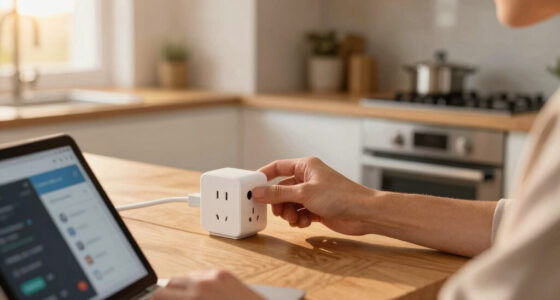
You can set up a smart plug without a hub by connecting it directly to your Wi-Fi network through the manufacturer’s app. This makes controlling appliances easier, faster, and more secure, with options for scheduling and voice commands—all without extra hardware.
Imagine flipping a switch on your phone while you’re still in bed or out running errands. Setting up a smart plug without a hub makes that possible in less than 10 minutes. It’s a simple way to add automation and energy control without investing in a complicated system.
In this guide, you’ll learn exactly how to connect your smart plug directly to your Wi-Fi, what to look for in a device, and how to make the most of its features. No fuss, no extra hardware—just smart, straightforward control for your everyday appliances.
Most smart plugs connect directly to Wi-Fi, no hub needed, making setup quick and simple.
Choose a model compatible with your voice assistant and check for energy monitoring if desired.
Secure your device with strong passwords and keep firmware updated for safety.
Use scheduling and routines to save energy and automate daily tasks effortlessly.
Read reviews and verify compatibility before purchasing to avoid frustration.
Smart plug control, no hub required.
TL;DR: Connect the plug directly to your Wi-Fi through the manufacturer’s app, name the device, then add schedules, routines, and voice commands. Most modern Wi-Fi plugs can be running in under 10 minutes without extra hardware.
Of new smart plugs released since 2020 support direct Wi-Fi setup without a separate hub.
Plug in, pair through the app, choose 2.4 GHz Wi-Fi, and assign a useful device name.
Most models vary by energy monitoring, voice assistant support, and privacy controls.
Most Wi-Fi smart plugs prefer the longer-range band.
No bridge, base station, or controller required.
Use app control, voice commands, and schedules.
Firmware patches keep the device safer over time.
Pick the right plug before pairing
A hub-free smart plug depends on direct Wi-Fi compatibility, app quality, and the ecosystem you already use. Choose the device around your network first, then look at automation extras.
Check the Wi-Fi band
Most models connect on 2.4 GHz. If your router merges bands, use the app’s guidance or temporarily separate network names during setup.
Match your assistant
Confirm support for Alexa, Google Assistant, Siri, HomeKit, Matter, SmartThings, or IFTTT before buying.
Look for useful extras
Energy monitoring, schedules, timers, away mode, and local control can turn a simple outlet into a smarter daily routine.
Connect it to Wi-Fi in five steps
Keep the plug close to your router for the first connection. Once it is paired, move it to the lamp, fan, coffee maker, or small appliance you want to control.
Plug In
Use an outlet near the router to reduce setup errors.
Open App
Install the latest manufacturer app and create an account if needed.
Pair Mode
Press the button until the LED shows the app’s pairing pattern.
Join Wi-Fi
Select the 2.4 GHz network and enter the password carefully.
Name It
Use clear names like “Bedroom Lamp” for voice commands.
Automate
Add schedules, timers, and routines after the connection is stable.
Without hub vs. with hub
For simple appliance control, direct Wi-Fi usually wins on speed, price, and simplicity. Hub systems can still help when you want a larger ecosystem with specialized protocols.
| Feature | Without Hub | With Hub | Reader Impact |
|---|---|---|---|
| Setup | ✓ Plug and connect via app | ~ Requires hub setup first | Fewer steps and less hardware to troubleshoot. |
| Connectivity | ✓ Direct Wi-Fi connection | ~ Depends on hub protocol | Best for a small number of everyday outlets. |
| Compatibility | ✓ Works with most Wi-Fi homes | ~ Limited by ecosystem | Always verify voice assistant support before purchase. |
| Cost | ✓ Lower total entry cost | ✗ Hub adds expense | Direct Wi-Fi is usually the simplest first smart-home upgrade. |
Secure it like a doorway to your network
A smart plug is small, but it still communicates with your router, app account, and sometimes cloud services. Good setup keeps convenience from becoming a weak point.
Safety checklist
- Use unique passwords for both Wi-Fi and the smart plug account.
- Install firmware updates as soon as the app offers them.
- Buy known brands that publish security updates and privacy practices.
- Remove old devices from the app before selling, gifting, or recycling.
Turn the plug into a routine engine
Once connected, the real value comes from automation. Schedules, timers, and scenes let the plug respond to your day instead of waiting for a manual tap.
Coffee at 6:30
Schedule a coffee maker or kettle so the first task of the day starts without touching a switch.
Kill standby drain
Turn off fans, lamps, and small electronics when rooms are empty or bedtime begins.
Simulate occupancy
Use away mode or timed lighting to make a home look active while you are out.
Automation maturity scale
Traceability: from outlet to outcome
The hub-free setup path is simple because each step connects directly to the next, from power to pairing to everyday control.
Plug
Power the device near the router.
Wi-Fi
Join the 2.4 GHz network.
App
Name, test, and update.
Voice
Connect assistant support.
Routine
Automate daily actions.
Fast answers before you buy
These are the questions that prevent most setup frustration: hub requirements, network compatibility, security, and what appliances make sense.
Do I need a hub?
No for most Wi-Fi smart plugs. They connect directly to your router through the manufacturer’s app.
Why is 2.4 GHz important?
Many plugs do not pair on 5 GHz. The 2.4 GHz band usually gives better range and broader device compatibility.
Can I control it remotely?
Yes, most apps allow remote control when the plug and your phone have internet access.
What should I plug in?
Lamps, fans, coffee makers, and small appliances are good fits. Avoid devices that are unsafe when unattended.
Quickly pick the right smart plug for your Wi-Fi setup
Most smart plugs operate over your home Wi-Fi, especially the 2.4 GHz band. That’s the backbone of your smart home network. Choosing a compatible device isn’t just about connectivity; it impacts how seamlessly your smart home functions. For instance, a device that supports your voice assistant (Alexa, Google, Siri) can be integrated into your existing ecosystem, providing voice control convenience. Features like energy monitoring and scheduling are not just bells and whistles—they can help you identify energy hogs, reduce bills, and automate routines, making your home smarter and more efficient. However, be aware that some features may require specific app integrations or firmware updates, which can sometimes introduce complexity or delays. Understanding these tradeoffs ensures you select a device that balances ease of use with the functionalities you need, ultimately leading to a more reliable and satisfying smart home experience.
As an affiliate, we earn on qualifying purchases.
Step-by-step: How to connect your smart plug to Wi-Fi in 5 minutes
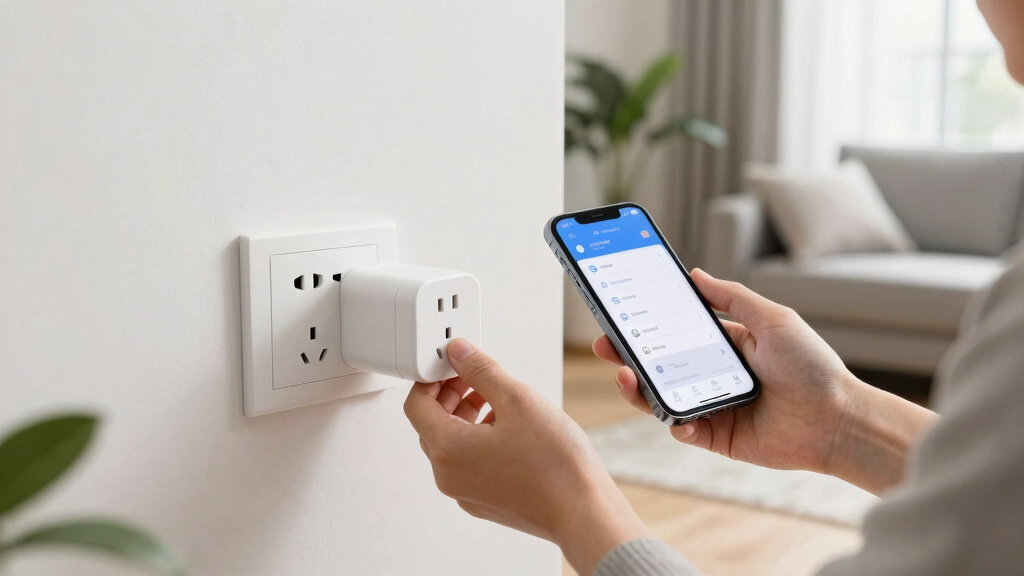
- Plug the device into an outlet near your router. Placing it close to your Wi-Fi source helps ensure a stable connection during setup, reducing the chance of errors or disconnections that could complicate the process.
- Download the manufacturer’s app on your phone. Make sure to get the latest version to access all features and security patches.
- Create an account if needed. Account creation often allows for remote control and firmware updates, which are vital for security and functionality.
- Follow in-app instructions to put the smart plug into pairing mode. This usually involves pressing a button until a LED indicator blinks in a specific pattern, signaling readiness to connect.
- Select your Wi-Fi network and enter your password. Some devices support 2.4 GHz only, so verify your network compatibility beforehand. Once connected, you can assign a name and set up routines, which will be essential for automation and voice control. Remember, a successful connection not only makes your device functional but also impacts its responsiveness and security—poor setup can lead to vulnerabilities or lag in automation commands.
Most apps guide you through these steps with clear visuals and prompts. Once connected, you can name your device and set routines.
smart plug compatible with Alexa Google Assistant
As an affiliate, we earn on qualifying purchases.
As an affiliate, we earn on qualifying purchases.
Comparison: Wi-Fi smart plugs with and without hubs
| Feature | Without Hub | With Hub |
|---|---|---|
| Setup | Plug and connect via app | Requires hub setup first |
| Connectivity | Direct Wi-Fi connection | Depends on hub’s protocol |
| Compatibility | Compatible with most Wi-Fi devices | Limited to hub’s ecosystem |
| Cost | Lower, as no hub needed |

TP-Link 𝗧𝗮𝗽𝗼 Smart Plug Wi-Fi Mini, Energy Monitoring, Compatible with Alexa & Google Home & Samsung SmartThings, Timer, 15A/1800W Max, ETL Certified, 2.4G Wi-Fi Only, Tapo P115(4-Pack)
- Energy Monitoring: Track energy use with charts and stats
- Cost Estimation: Estimate energy bills and schedule devices
- Smart Device Charging: Auto cut power to prevent overcharging
As an affiliate, we earn on qualifying purchases.
As an affiliate, we earn on qualifying purchases.
Secure your smart plug—keep your network safe
Smart plugs rely on Wi-Fi, so security matters. Always use a strong, unique password for your Wi-Fi and app accounts. Keep firmware updated to patch vulnerabilities. For example, a reputable brand will push security updates regularly—install them ASAP.
Think of your smart device as a door to your home’s digital ecosystem. If you leave it unlocked or use weak passwords, hackers could potentially access your entire network, risking data theft or unauthorized control of your devices. Regularly updating firmware acts like changing the locks—closing security gaps before they can be exploited. Using a strong, unique password for each device prevents attackers from guessing or brute-forcing access, which is especially important as more devices connect to your network. These security practices aren’t just precautions—they are essential steps to maintaining your smart home’s integrity and protecting your personal information from cyber threats.
As an affiliate, we earn on qualifying purchases.
Maximize your smart plug’s potential with routines and automation
Once connected, set schedules and routines to turn devices on or off automatically. For instance, programming your coffee maker to start brewing at 6:30 AM can ensure your morning starts smoothly without manual intervention. Similarly, setting your living room lamp to turn off when you leave the house not only saves energy but also enhances your home’s security by creating the illusion of occupancy. Many apps allow you to create custom routines—these are like mini scripts that automate multiple actions based on triggers such as time, location, or device status. Understanding how these routines work and choosing the right triggers is crucial because it determines how effectively your automation responds to your daily habits. Properly implemented routines can significantly improve energy efficiency, security, and convenience, transforming a simple device into a central hub of your smart home ecosystem. The key is to think about your routines as tools to streamline your lifestyle, making automation an intuitive and valuable part of your daily routine.
Frequently Asked Questions
Do I need a hub to use a smart plug?
Most smart plugs connect directly to your Wi-Fi network and do not require a hub. This not only simplifies the setup process but also reduces the overall complexity of your smart home system, making it more reliable and easier to troubleshoot. Without a hub, your smart plug communicates directly with your Wi-Fi router, which means fewer points of failure and less hardware to manage. This direct connection is especially advantageous for users new to smart home technology, as it lowers the barrier to entry and enables quick, straightforward automation of your appliances.
How do I connect a smart plug to my Wi-Fi?
Download the manufacturer’s app, follow the setup instructions to put the device into pairing mode, then select your Wi-Fi network and enter your password. This process is typically designed to be intuitive, guiding you step-by-step with prompts and visuals. The importance of this process lies in establishing a secure and stable connection; a poor setup can lead to connectivity issues, delays in command execution, or security vulnerabilities. Ensuring your device is on a compatible frequency (usually 2.4 GHz) and that your network credentials are correct will help maintain a reliable link, which is essential for seamless automation and voice control in your smart home ecosystem.
Are smart plugs secure?
Yes, if you use strong, unique passwords, keep firmware updated, and buy from reputable brands. These steps are crucial because smart devices are entry points into your network; weak security can expose your entire home to cyber threats. Regular firmware updates patch known vulnerabilities, much like security updates for your computer. Using complex passwords prevents attackers from easily guessing or brute-forcing access. Additionally, enabling two-factor authentication where available adds an extra layer of security. These practices collectively ensure that your smart plug remains a safe and effective part of your smart home, protecting your personal data and preventing unauthorized control.
Can I control my smart plug remotely?
Absolutely. As long as your device is connected to Wi-Fi and your phone has internet, you can control it from anywhere using the app or voice commands. Remote control is one of the key advantages of direct Wi-Fi smart plugs, enabling you to manage your appliances even when you’re away from home. This feature not only offers convenience but also enhances security—such as turning on lights to simulate occupancy when you’re on vacation. To ensure reliable remote access, make sure your device’s firmware is up-to-date and that your app is configured correctly. This way, you can enjoy the full benefits of your smart home system, regardless of your location.
What devices can I control with a smart plug?
Anything that plugs into an outlet—lamps, fans, coffee makers, small kitchen appliances. Just check the device’s power requirements first to ensure compatibility. Smart plugs are versatile, but they have limitations based on their wattage and current ratings. Overloading a smart plug can lead to device failure or safety hazards. Also, some high-power appliances like space heaters or refrigerators may not be suitable for plug-in automation due to their power draw. Always verify the specifications of both your smart plug and the device you intend to control to ensure safe and reliable operation, maximizing the convenience and energy savings that smart plugs can provide.
Conclusion
Setting up a smart plug without a hub is a straightforward way to add automation to your home. It’s about making everyday appliances smarter—without extra hardware clutter.
Picture yourself controlling your lights, fans, or coffee maker with just a tap or voice command. That’s the real power of a hub-free smart home. Gear up, connect, and enjoy smarter living—one outlet at a time.
College move-in / dorm season Picks
dorm essentials
As an affiliate, we earn on qualifying purchases.